How to Manage Buyer Comments in Galaxy Store Using the Developer API
Shamima Nasrin
Engineer, Samsung Developer Program
Managing user feedback is an important part of maintaining and improving any published application. Whether you manage one or multiple applications on Galaxy Store, efficiently handling buyer comments can significantly enhance user satisfaction and application quality.
To simplify this process, Galaxy Store Developer API provides several powerful APIs that enable you to manage applications, monitor statistics, and interact with users programmatically. Among these capabilities, the buyer comment management APIs are particularly useful, as they allow you to retrieve buyer comments, respond directly to users, and manage replies without manually accessing Galaxy Store Seller Portal.
These APIs empower you to view user feedback, suggestions, and ratings, which are essential for application improvement. You can use this information to identify issues, address user concerns, and implement new features. By interacting with users through these APIs, you can foster a more engaged and satisfied user base, ultimately leading to better application performance and user retention.
This tutorial focuses on following three important API endpoints, which manage buyer’s feedback efficiently:
Prerequisites
Before you begin implementing these APIs, ensure that the following requirements are fulfilled, as outlined in Galaxy Store Developer API documentation:
- A Samsung account registered through Galaxy Store Seller Portal.
- A service account ID obtained from Seller Portal.
- The registered application has its
appStatusproperty set to “SALE”. - A valid access token is required for calling every Galaxy Store Developer API endpoint. For more information, see the blog about generating an access token.
- A Python environment must be set up on the PC.
To implement the buyer comment APIs using Python, there are some common code implementations. Let’s define them first.
Common Dependencies and Headers
The dependency library, headers and authorization process are common for all API requests.
Dependency Library
To send HTTP requests to the API endpoints using a Python script, import the dependency library as requests and also import json for converting responses in JavaScript Object Notation (JSON) format.
# Importing the requests library
import requests
# Importing the json library
import json
Headers
The service account ID and access token are required for calling any Galaxy Store Developer API. These credentials must be included in the request headers, to authenticate and authorize access to the associated Seller Portal account.
# Access token and headers
accessToken="<your-access-token>"
Authorization="Bearer " + accessToken
SERVICE_ACCOUNT_ID="<your-service-account-id>"

# Header to be sent to the API
headers = {
'Authorization': Authorization,
'service-account-id': SERVICE_ACCOUNT_ID
}
The above library and headers represent the common configuration used for buyer comment management APIs. It can be defined once and reused across different API implementations.
Now, let’s proceed with the API-specific implementation.
Implementing the “View Buyer Comments” API
This endpoint allows retrieving buyer comments and comment-related data for any specific application directly from Seller Portal.
There are three common implementation scenarios using the View Buyer Comments API:
- Retrieving buyer comments
- Retrieving buyer comments using pagination
- Retrieving a specific buyer comment
Defining the API Endpoint
Before sending the API request, define the required application parameters, including the contentId, commentId, and pageNo. The contentId is mandatory for retrieving buyer comments associated with a specific application. The commentId is optional and should be included when retrieving a particular buyer comment. Similarly, pageNo is optional and is used to retrieve comments page by page, with the default value set to 1 if no page number is specified.
Retrieving Buyer Comments
The View Buyer Comments API allows you to retrieve user reviews submitted for your application in Galaxy Store. You can use this information to analyze customer feedback, monitor user satisfaction, identify common issues and improve the overall user experience.
This is the API endpoint for retrieving all the buyer comments from the first page related to the application. Here, contentId is the required parameter and mentioning the pageNo is optional. If you do not send the pageNo as a parameter, the API returns the data from the first page by default.
contentId = "<Content ID of your application>"
# Defining the API endpoint and retrieve all comments of the application
api_url=f"https://devapi.samsungapps.com/seller/v2/content/comment?contentId={contentId}"
This API returns all the comments for a specific application available in the first page as pageNo is not defined. To retrieve data from the subsequent pages, you need to use pagination.
Retrieving Buyer Comments Using Pagination
Applications with large user bases may accumulate thousands of reviews. Retrieving all comments in a single request can result in large response payloads, increased processing time, higher memory consumption, reduced application performance and so on.
Pagination solves this problem by dividing data into manageable pages. This approach enables applications to load review data incrementally.
The comments are distributed among the pages in the following ranges:
pageNo= 1 → comments 1–20pageNo= 2 → comments 21–40pageNo= 3 → comments 41–60, and so on
This API endpoint retrieves all the comments from the mentioned page of the application. Here, contentId and pageNo both are mandatory fields to get all data for a specific page of a particular application.
contentId = "<Content ID of your application>"
pageNo = 1
# Defining the API endpoint and retrieve page-wise comments from the application
api_url=f"https://devapi.samsungapps.com/seller/v2/content/comment?contentId={contentId}&pageNo={pageNo}"
Using this API, you can browse reviews efficiently page by page. In this example, this API returns all comments available in the first page (up to 20) for the specific application.
Retrieving a Specific Buyer Comment
Sometimes you need to retrieve details for a single review rather than the entire dataset. This is useful when investigating a reported issue, responding to customer concerns, reviewing flagged feedback and so on. This targeted retrieval reduces unnecessary data transfer and improves performance.
This API endpoint is for retrieving a specific buyer comment for the application. Here, contentID and commentID are the mandatory parameters.
contentId = "<Content ID of your application>"
commentId = "<Specific comment ID>"
# Defining the API endpoint and retrieve a specific comment
api_url=f"https://devapi.samsungapps.com/seller/v2/content/comment?contentId={contentId}&commentId={commentId}"
This API returns the details of a specific comment from the application. Just send your application content ID and comment ID as parameter using this API. It returns the comment with details as output.
You can get the comment ID using the View Buyer Comments API.
In the following examples, three different API endpoint configurations are demonstrated for retrieving all comments, a specific comment, and page-wise comments from an application. Depending on your implementation requirements, use the appropriate API endpoint configuration to retrieve buyer comment data.
Sending a GET Request
To retrieve buyer comments and comment-related data, an HTTP GET request is sent to the Galaxy Store server using the defined api_url along with the required request headers. The api_url specifies the target endpoint for retrieving buyer comment data, while the headers ensure proper authentication and authorization of the account before accessing the API resources.
try:
   response = requests.get(api_url, headers=headers)
   try:
       data_shows = response.json()
       print("Response JSON:", json.dumps(data_shows, indent=4))
   except:
       print("Response is not a valid JSON")
except Exception as e:
   print("Error:", str(e))
Response on Success
After the request is successfully processed, the Galaxy Store server returns a structured JSON response containing the buyer comment data for the specified application. This response includes overall comment statistics along with the detailed information for each individual comment.
The response is primarily divided into two sections: general comment metadata (such as total count, page number, and pagination details) and comment-specific data. If you have not yet replied to a particular comment, the replyId and replyText fields are not available in the response.
Response JSON: {
    "resultCode": "0000",
    "resultMessage": "Ok",
    "data": {
        "contentId": "Content ID of your application",
        "totalCount": 1,
        "pageNo": 1,
        "totalPage": 1,
        "comments": [
            {
                "commentId": "specific comment Id",
                "countryCode": "USA",
                "buyerId": "osas**",
                "rating": 10,
                "date": "2026-05-06",
                "commentText": "This app is good and user friendly \ud83d\ude42",
                "countryName": "USA",
                "device": "Galaxy Z Flip5",
                "appVersion": "1.0",
                "replyId": "reply Id",
                "replyText": "Thank you for your comment."
            }
        ]
    }
}
Here, the response shows that there is one comment available for this application and it has a reply from the developer as well. You can get all the relevant information about the buyer comment from this above response.
Implementing the “Add Reply to Buyer Comment” API
Seller Portal allows reviewing the buyer comments and submitting replies to them. For a single comment, you can only reply once. If any update or modification is needed to a reply, delete the current reply and add a new reply to the comment. Reply text limit is up to 1400 bytes.
The following illustration of the Seller Portal UI illustrates buyer comments along with developer replies for published applications. Through this interface, you can select a comment using the checkbox option and submit a reply by clicking the Select and Reply button, enabling efficient management of similar user feedback. If you have already replied to a comment, the reply option is unavailable.
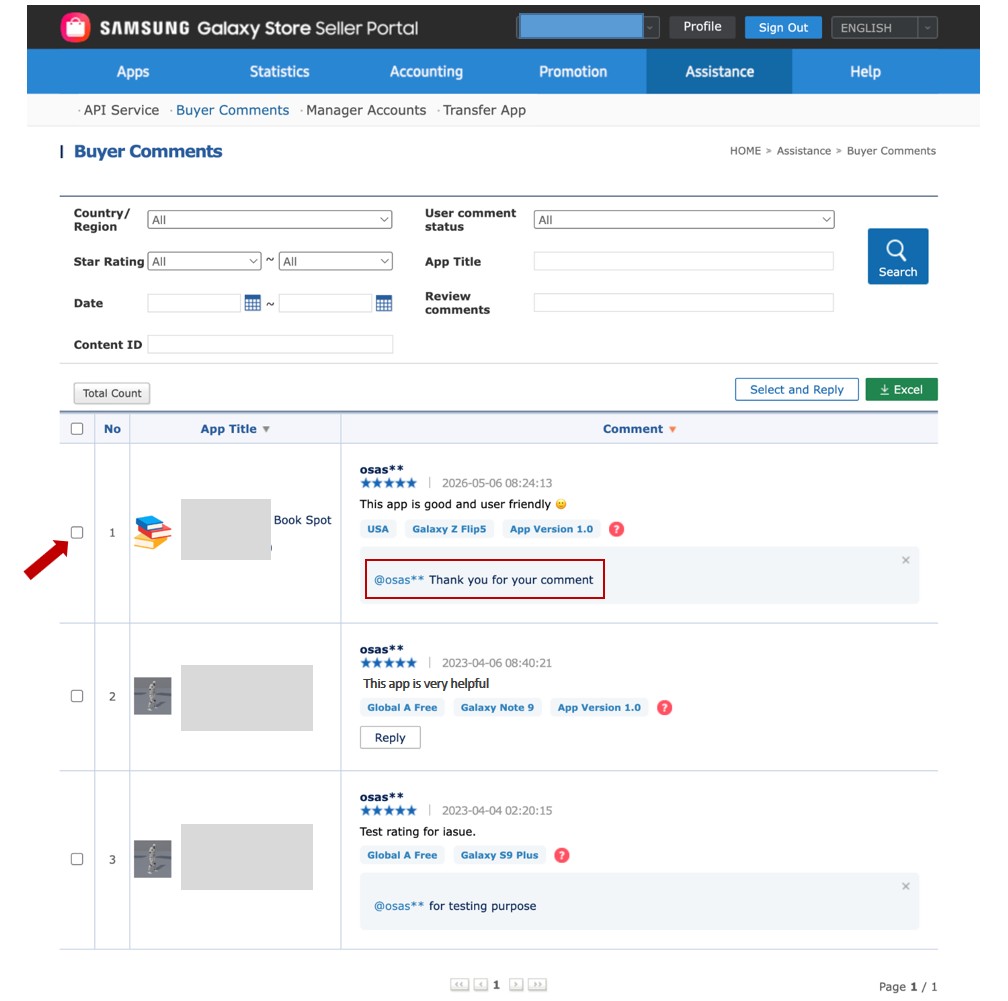
Figure 1: Seller Portal UI for replying to a buyer comment
Defining the API Endpoint
The following is the API endpoint used to submit replies to buyer comments.
# API endpoint
api_url="https://devapi.samsungapps.com/seller/v2/content/comment/reply"
Creating the Request Payload
The following parameters define a specific buyer comment and the corresponding reply message to be submitted.
payload = {
    "contentId": "<Content ID of your application>",
    "commentId": "<Specific comment ID>",
    "countryCode": "USA",
    "replyText": "Thank you for your comment"
}
Sending a POST Request
After configuring the API endpoint and creating the payload, send the HTTP POST request to the Galaxy Store server with the request library, api_url, JSON payload and headers.
try:
    response = requests.post(api_url, headers=headers, json=payload)

    try:
        data = response.json()
        print("Response JSON:", json.dumps(data, indent=4))
    except:
        print("Response is not a valid JSON")

except Exception as e:
    print("Error:", str(e))
Response on Success
This is the response to the Add Reply API after a successful POST request from the Galaxy Store server.
Response JSON: {
"resultCode": "0000",
"resultMessage": "Ok"
}
However, if the comment has a reply already, the operation instead returns the following error response.
{
    "from": "seller",
    "body": {
        "resultCode": "3214",
        "resultMessage": "*** already replied to that comment"
    },
    "message": "Request failed with status code 403"
}
Implementing the “Delete Reply to Buyer Comment” API
The Delete Reply to Buyer Comment API enables you to remove previously submitted replies from buyer comments. Since the Galaxy Store Developer API does not support direct modification of an existing reply, you must first delete the current reply and then submit a new response using the Add Reply to Buyer Comment API.
Defining the API Endpoint
The following is the API endpoint used for deleting a previously submitted reply. For uniquely identifying replies, send the replyId as a parameter.
# Reply ID from view buyer comment API
replyId = "<Your reply ID>"
# API endpoint (with query parameter)
api_url=f"https://devapi.samsungapps.com/seller/v2/content/comment/reply?replyId={replyId}"
You can get the replyId value using the API described in the Implementing the “View Buyer Comments” API section.
Sending a DELETE Request
Send the HTTP DELETE request to the Galaxy Store server with the API endpoint and headers to remove the specified reply associated with the buyer comment.
try:
    response = requests.delete(api_url, headers=headers)

    try:
        data = response.json()
        print("Response JSON:", json.dumps(data, indent=4))
    except:
        print("Response is not a valid JSON")

except Exception as e:
    print("Error:", str(e))
Response on Success
After a successful DELETE request from the Galaxy Store server, the server returns the following response:
Response JSON: {
"resultCode": "0000",
"resultMessage": "Ok"
}
Response on Error
See the failure responses for a list of possible response codes returned when a request fails.
Conclusion
The Galaxy Store Developer API offers a structured and efficient approach to managing buyer feedback in a programmatic way. By utilizing the View Buyer Comments, Add Reply, and Delete Reply APIs, you can streamline customer support operations and ensure timely engagement with user feedback. In addition, by adopting these APIs within internal tools or management dashboards, you can reduce manual effort, automate repetitive support tasks, and focus more on enhancing core application features and user experience. This integrated workflow helps maintain clear and consistent communication with users, ultimately improving the overall quality and reliability of the application.
If you face any type of problems or do not understand anything in this article, please feel free to reach out to us on the Samsung Developers Forum or contact us through Developer Support.
Additional Information
- Register Your Application in Seller Portal: To register your application in Seller Portal, follow the step-by-step instructions provided here.
- Use Service Account ID and Access Token: To use the service account ID from Seller Portal and using an access token from the Galaxy Store Developer API, follow the detailed instructions provided here.
- Python Environment Setup Guide: To install Python and configure the development environment required for implementing these APIs, follow the setup instructions provided here.