Smoother and longer Gameplay Through AI-Based Pixel and Frame Reconstruction
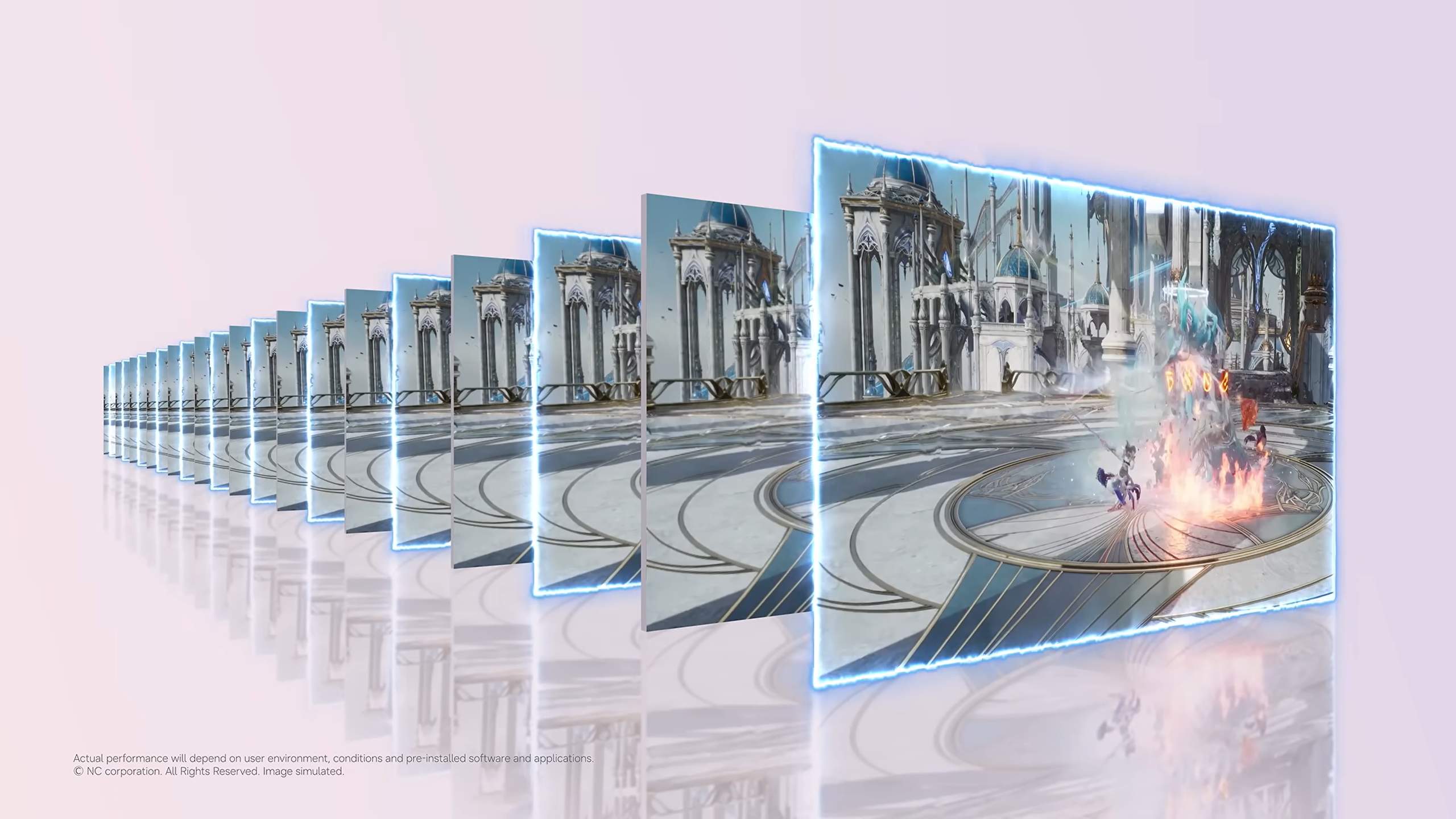
Neural Frame Fusion (NFF) is a rendering technology that leverages AI to generate pixels and frames in real-time during gameplay. NFF combines Neural Super Sampling (NSS) and Neural Frame Generation (NFG) to deliver a smooth gaming experience.
NFF is designed with both game developers and players in mind. Developers can easily integrate AI-based reconstruction techniques into supported game engine workflows, implementing high-fidelity graphics with more efficient power and performance. Players can enjoy smooth motion and sustained performance in games while reducing battery consumption, even on the same hardware.
Neural Super Sampling & Neural Frame Generation
Neural Super Sampling (NSS)
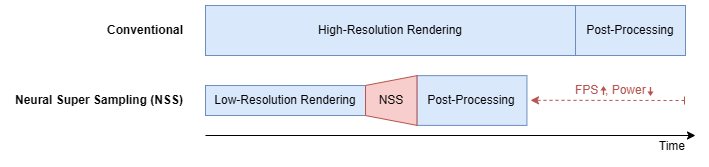
Neural Super Sampling (NSS) generates higher-resolution images from low-resolution rendered results. In the Unreal Engine implementation, NSS utilizes scene color, depth, and motion vector information, accumulating pixel information over time through temporal history and jittered sampling.
NSS can be enabled independently in games without enabling other features.
Neural Frame Generation (NFG)
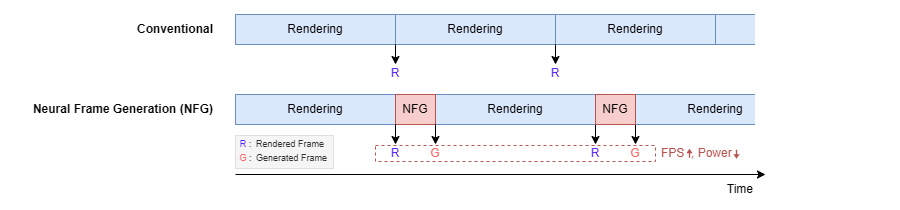
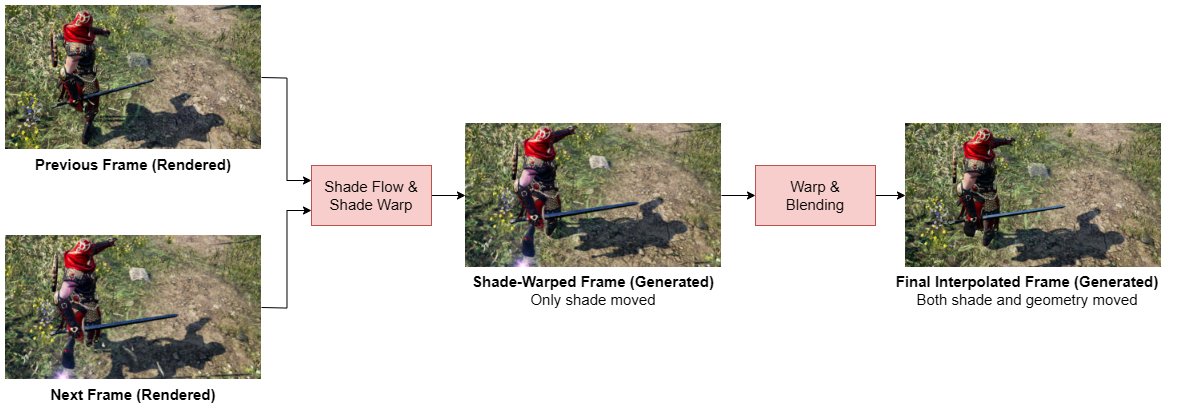
Neural Frame Generation (NFG) generates one interpolated frame between two rendered frames. It uses current and previous color frame, depth, and motion vector data together to reconstruct motion at the midpoint between two frames. This process combines the engine's motion and depth data with AI shade flow to generate the final result.
NFG can also be controlled independently, so NSS and NFG can be used separately in games.
NSS Operating Method
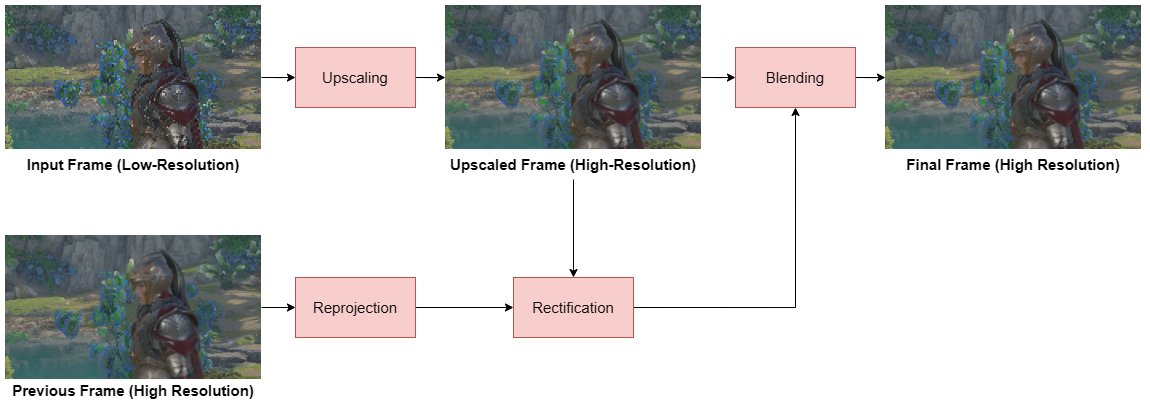
NSS is integrated into the Unreal Engine rendering pipeline's temporal upscaling path. It generates upscaled output images by using the current low-resolution scene and information from previous frames.
1. Current Scene Input Collection
NSS receives current scene color, depth, and velocity inputs. Color provides information about the current rendered image, while depth and motion vector describe the scene's geometry and motion. This information is used to better handle newly visible pixels and disocclusions.
2. Temporal Detail Construction Using Jittered Samples
NSS uses a sequence of temporal history and jittered sample positions to accumulate past pixel information. Rather than relying on a single rendered image, it leverages sub-pixel information accumulated over time to generate more sophisticated results.
In code, developers can configure the number of jitter samples to control the temporal sampling pattern in the rendering workflow. Developers can adjust the number of jitter samples according to their game scene characteristics.
3. Output Reconstruction and History Retention
NSS saves the temporal-AA history for the next frame. When history is invalid (such as initialization or after scene changes), temporal reconstruction can be performed by clearing the history before using console variables.
NFG Operating Method
NFG executes after the game renders the final frame. The game engine collects color, depth, and motion vector from the game view and maintains the previous frame buffer while performing the following three steps.
1. Motion and Depth Data Preparation
NFF converts the engine's depth and velocity data into forward and inverse motion vectors for frame reconstruction. This conversion step handles both object motion and camera motion together. It also extends foreground depth around motion boundaries (dilation) to more stably preserve thin or fast-moving elements during subsequent reprojection.
2. AI Shade Flow Estimation
NFF compares the current frame with the motion-warped previous frame to identify shading and shadow changes. A lightweight multi-scale optical-flow CNN estimates these shading motions at reduced resolution. The results are used to correct shading changes in the current frame before final frame reconstruction.
3. Interpolated Frame Generation and Blending
NFF reprojects forward and inverse motion vectors to the midpoint between frames. Using the provided information, it determines which color information from the previous frame, current frame, or both frames is most reliable for each region. It then blends these to generate the final interpolated frame.
Rendering Pipeline Integration
In the Unreal Engine implementation, NSS operates before post-processing and NFG operates after post-processing, working together with the game rendering pipeline. Color and depth history from previous frames are maintained, and the generated image is displayed after processing the current frame.
NFF supports Android and Vulkan. The NFG implementation includes custom Vulkan swapchain and frame-pacing modules to manage display timing of rendered and interpolated frames.
NFF is supported on Unreal Engine. When integrated with Unreal Engine, NFF is installed as a plugin in the source-built engine. An engine integration patch matching the engine version must be applied to connect rendering and Vulkan swapchain hooks that cannot be contained within the plugin.
Developer Control and Verification
NFF is designed to be enabled and evaluated by device, project, and rendering feature.
NFF's active state is controlled via the device/project support gate. NSS and NFG can be used independently.
r.NFF.Supported=1 enables NFF on the target device profile.
r.NFF.SS.Enabled enables Neural Super Sampling.
r.NFF.FG.Enabled enables Neural Frame Generation.
For detailed console variables, refer to the developer documentation.
Unreal Engine Integration Summary
Integration steps for incorporating NFF into Unreal Engine:
Prepare a supported source-built Unreal Engine version.
Copy NFF to Engine/Plugins/Runtime/NFF/.
Apply the engine integration patch matching your Unreal Engine version.
Prepare NFF-SDK headers and Android native libraries, then regenerate project files and build the engine or editor targets.
Add r.NFF.Supported=1 to the target device profile.
Enable NSS, NFG, or both features and verify and adjust your chosen rendering path with target gameplay content.
Manage Your Cookies
We use cookies to improve your experience on our website and to show you relevant
advertising. Manage you settings for our cookies below.
Essential Cookies
These cookies are essential as they enable you to move around the website. This
category cannot be disabled.
Company
Domain
Samsung Electronics
developer.samsung.com, .samsung.com
Analytical/Performance Cookies
These cookies collect information about how you use our website. for example which
pages you visit most often. All information these cookies collect is used to improve
how the website works.
Company
Domain
Samsung Electronics
.samsung.com
Functionality Cookies
These cookies allow our website to remember choices you make (such as your user name, language or the region your are in) and
tailor the website to provide enhanced features and content for you.
Company
Domain
Samsung Electronics
developer.samsung.com, google.account.samsung.com
Preferences Submitted
You have successfully updated your cookie preferences.