Samsung Electronics Launches One UI 9 Beta for Galaxy S26 Series Users
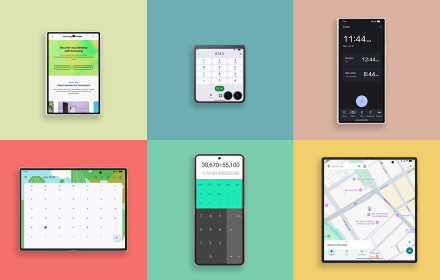
Samsung Electronics now delivers an even more advanced AI experience with its One UI 9 beta program based on Android 17. The program begins first with Galaxy S26 series users before the official launch, and enrollment for it will open in 6 countries including Korea and the U.S. through the Samsung Members application as it rolls out. This version update offers significantly enhanced personalization options, including Quick Settings layout customization, Samsung Notes, and Creative Studio. The user feedback collected from the beta program will be incorporated into the final version. One UI 9 promises improved accessibility and stronger device security that build into a next-level mobile experience. Learn more about the beta program in the Samsung Electronics Newsroom.
Learn more |
|
|
|
Samsung IAP Unreal Engine Plugin Updated to Version 6.5.0The Unreal Engine Plugin v6.5.0 integrates the latest Samsung IAP SDK features to provide a richer and more reliable in-app purchase experience.
This update includes support for features including subscription promotion information for users, subscription tier transitions within the same service, and explicit acknowledgement of purchases for non-consumable and subscription products. The passThroughParam parameter previously used during purchase requests has been deprecated, and fraudulent payment detection is improved by supporting the entry of obfuscated account and profile information when submitting a purchase request, helping provide a safer and more reliable payment environment.
See the guide to learn how to integrate the latest plugin. |
|
|
|
Samsung Health SDK for Android Deprecation: Time to Move to Samsung Health Data SDK
The Samsung Health SDK for Android has been deprecated as of July 31, 2025. Developers are strongly recommended to migrate to the Samsung Health Data SDK to maintain access to supported data types and utilize additional health data types such as IHRN (Irregular Heart Rhythm Notification) and sleep apnea risk detection.
See the Migration Guide and Partner Request pages for detailed migration instructions. For the full list of supported data types, see the Samsung Health Data SDK documentation page. |
|
|
|
How Samsung Works with Partners to Advance Health and Wellness
Samsung Digital Health is building a partnership-driven connected healthcare ecosystem to help bridge the gap between everyday wellness and clinical care. Samsung is continuing to expand the capabilities of the Samsung Health platform through its device infrastructure of more than 500 million consumer products sold annually, the acquisition of the digital health integration platform Xealth, and collaborations across various industries. The company also provides standardized and encrypted data through SDKs and APIs to support safer data access and solution development. Samsung continues to expand collaboration with innovative companies and research institutions around the world to build an integrated ecosystem that brings together technology, research, and healthcare services. Learn more about the Samsung Digital Health partnership on our blog.
Learn more |
|
|
|
Personalized Watch Faces with Photo Slot
Deliver an even more personalized experience to Galaxy Watch users with Watch Face Studio's Photo Slot feature. This tutorial walks you through implementing the Photo Slot feature, which allows users to set images in their watch face directly from their phones—no coding required.
From designing more dynamic watch faces to detailed instructions for implementing Photo Slot and sample projects, find out more on our blog.
Learn more |
|
|
|
Pix Comes to Samsung Wallet - New Payment Method for Brazil
Samsung Wallet now integrates Pix, Brazil’s most widely used payment method, making everyday payments faster, simpler, and more seamless than ever.
With a one-time bank account connection, users no longer need to open their banking applications for every transaction. The swipe-up payment method, QR code scanning, and Pix copy-and-paste payments all are supported; simply swipe up on a Galaxy device to authenticate with a fingerprint or PIN and tag the terminal, scan a QR code, or copy and paste a Pix string to pay instantly.
Powered by multi-layered Samsung Knox security technology, Samsung Wallet delivers a smoother and faster mobile payment experience for users in Brazil by building a secure container wallet integrating credit cards, debit cards, transit card, boarding pass, ticket and now Pix. Learn more in our blog.
Learn more |
|
|
|
Samsung Wallet Introduces Trips to Manage Your Schedule During Traveling
Flight schedule, boarding passes, hotel bookings, event tickets, and activities, all scattered across emails and applications. Once they are added to Samsung Wallet, you can create a complete trip itinerary, one place all the items come together in. This means no more digging through confirmation emails or going back and forth through multiple applications. With a single tap on Add to Wallet, you are proposed to create a timeline that all your booking information lines up neatly on. Timely reminders keep you on track at every step, from going through your pre-departure checklist to local transportation; so you never miss a beat.
Check out our blog to learn more about Trips in Samsung Wallet. |
|
|
|
Continuous Heart Rate Tracking on Galaxy Watch, Even with the Screen Off
Health and fitness are the most popular features for Galaxy Watch running Samsung's Wear OS. Implementing these features requires a continuous data stream to work seamlessly. Galaxy Watch pauses sensor data collection when the screen turns off to optimize power consumption, which can be problematic for applications that require continuous monitoring, such as health trackers and medical wearable devices. This tutorial shows how to collect heart rate data without interruption using a foreground service and a wake lock, even when the screen is turned off. Check out our blog to learn how to control sensors continuously in the background, see the detailed implementation guide, and find sample projects with code examples.
Learn more |
|
|
|
Self-Attention Decomposition for Training-Free Diffusion Editing
Diffusion models have established themselves as the state of the art for generative modeling, due to their ability to produce high-fidelity images. However, making precise, targeted edits such as changing someone's age or adjusting a hairstyle remains a significant challenge. Existing approaches often require analyzing patterns through sampling large number of images, training auxiliary networks, or performing complex geometric calculations to pinpoint the desired editing directions, resulting in significant computational cost and time delays.
Samsung R&D Institute India proposes a new editing method based on self-attention, which enables quick and precise editing of image attributes in diffusion models. The research is inspired by the insight that diffusion models are already learning internal rules for controlling key semantic attributes such as age and hairstyle during training numerous images. A mathematical approach that applies eigen decomposition to self-attention weight matrices has been enough to accurately extract the desired editing directions without modifying the original model. This method enables precise control and universal applicability, while reducing the editing time by 60%. Find out more about it on the Samsung Research blog.
Learn more |
|
|
|
GalaxyEdit: Large Scale Image Editing Dataset with Enhanced Diffusion Adapter
Can you imagine being able to add or remove objects in an image, and just how convenient that would be? Text-driven image editing using diffusion models has gained significant attention for this kind of advanced editing performance, but training these models requires massive amounts of high-quality sample data, as well as substantial cost and time for manual processing.
To overcome these challenges of data building, Samsung Research proposes GalaxyEdit, a large dataset created using a completely automated pipeline without human labelling work, and ControlNet-Vxs, a highly efficient lightweight adapter. With GalaxyEdit, it is possible to secure a wide range of natural-language prompt data to request adding and removing objects without human instructions, while ControlNet-Vxs maximizes information exchange between networks through Volterra Neural Network (VNN) layers. Combining these two technologies increases parameter efficiency to make the approach optimized for mobile device environments, as well as to work quickly and securely on-device. Learn more about GalaxyEdit and the new possibilities for on-device image editing on the Samsung Research blog.
Learn more |
|
|
|
|
|
|
|
https://developer.samsung.com
Copyright© %%xtyear%% SAMSUNG All Rights Reserved.
This email was sent to %%emailaddr%% by Samsung Electronics Co.,Ltd.
You are receiving this email because you have subscribed to the Samsung Developer Newsletter through the website.
Samsung Electronics · 129 Samsung-ro · Yeongtong-gu · Suwon-si, Gyeonggi-do 16677 · South Korea
Privacy Policy
Unsubscribe
|
|
|
|
|
|
|
|
|