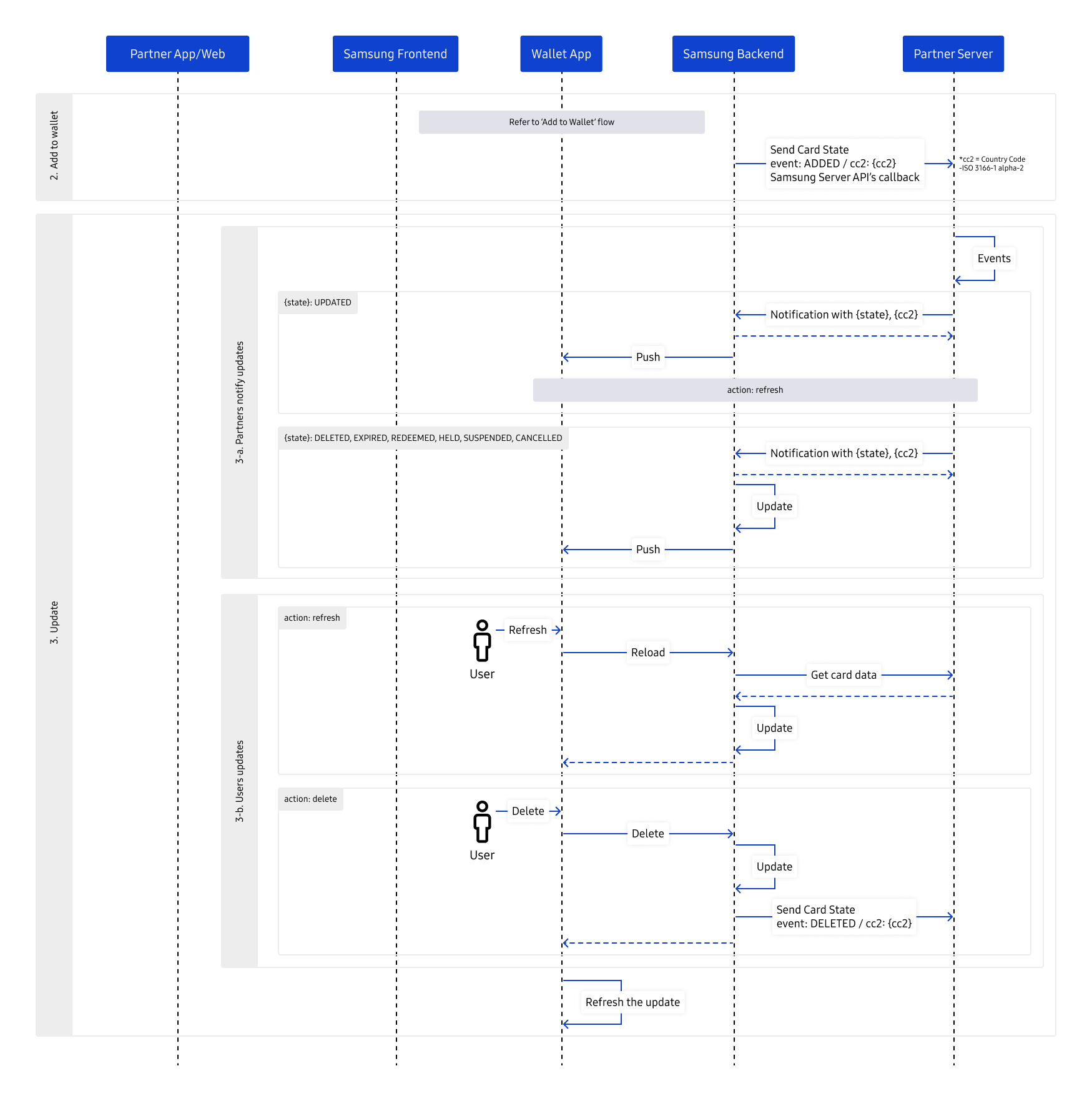
Lifecycle integration is bidirectional. Samsung calls partner-hosted endpoints to retrieve data and report events; the partner calls Samsung-hosted endpoints to request an update or cancellation.
The partner stores the callback routing values supplied with the ADDED event and correlates them with the Card ID and refId.
When card content changes, the partner calls the applicable Samsung Server API.
Samsung may then call the partner's Get Card Data endpoint to obtain the current content.
Implement only the endpoints required by the chosen add and lifecycle flow. All implemented endpoints must authenticate requests and safely handle retries and duplicate delivery.
Partner Server APIs
Samsung server can call the following API by using endpoint on the registered card information. If the partner server manages an inbound allow list, contact us to register Samsung server IP address.
Get Card Data
The Get Card Data API enables Samsung Wallet to retrieve the latest data for a card from the partner server. Samsung calls this partner-hosted endpoint when it needs current card content, and the partner returns either an encrypted cdata value or a card object.
Request
Type
Value
Description
Method
GET
URL
{Partner server URL}/cards/{cardId}/{refId}?fields={fields}
(Required) A unique content identifier defined by the content provider. It is managed by the partner for each user's Wallet Card content and should not use predictable values.
Query Parameter
fields String(128)
(Optional) Attributes to retrieve. Specify multiple attributes with commas as separators. e.g. balance,barcode.value
Payload
N/A
Example
GET /cards/12584806754/ref-20230304-0003
Response
Type
Value
Description
HTTP Status
200 OK 204 No Content
Payload (Option1)
cdata String(4096)
(Conditional) Card object. (JSON) * This field needs to be encrypted. * See Card Data Token (cdata)
Payload (Option2)
card Object
(Conditional) Card information * Card object as an alternative to cdata * If cards include sensitive data, highly recommend using cdata
(Required) A unique content identifier defined by the content provider. It is managed by the partner for each user's Wallet Card content and should not use predictable values.
data[].createdAt Long(13)
(Required) Timestamp of data. Epoch timestamp in milliseconds.
data[].updatedAt Long(13)
(Required) Timestamp of data. Epoch timestamp in milliseconds.
data[].state String(16)
(Required) Wallet card state e.g., ACTIVE, UPDATED, EXPIRED, REDEEMED, HELD, DELETED, CANCELED, PENDING, SUSPENDED * See Card States for details
data[].language String(8)
(Required) Default content language code. e.g., en, ko
Requests cannot or will not be processed the request due to something that is perceived to be a client error
401 Unauthorized
Authorization token is invalid or expired
500 Internal Server Error
Server encountered an unexpected condition that prevented it from fulfilling the request
503 Service Unavailable
Server is not ready to handle the request
Send Card State (Send Card Event)
The Send Card State API enables Samsung Wallet to report card events to the partner server. The partner uses the Card ID and refId to correlate each event with the corresponding card and stores any callback routing information supplied with an ADDED event for subsequent lifecycle operations.
(Required) A unique content identifier defined by the content provider. It is managed by the partner for each user's Wallet Card content and should not use predictable values.
Server encountered an unexpected condition that prevented it from fulfilling the request
503 Service Unavailable
Server is not ready to handle the request
Request Action
Handles card-related operations dynamically based on the specified actionType.
The request must include an actionType to specify the intended operation, along with a corresponding actionPayload that contains the relevant data for that action.
The response may include data required for the next step in the process.
This API is designed to handle sequential or conditional workflows, allowing both the server and client to coordinate securely across multiple steps.
Request
Type
Value
Description
Method
POST
URL
{Partner server URL}/cards/{cardId}/{refId}/requestAction
Headers
Authorization String(1024)
(Required) Authentication token composed of JWT. Headers and payloads may include items that require verification such as timestamp, OTP, certificate info. The token may use the "Bearer" authorisation scheme. e.g., Bearer <credentials> * See REST API Authorization Token (JWT / JWS)
(Required) Wallet card identifier * Refer to the Add Card Links
refId String(128)
(Conditional) A unique content identifier defined by the content provider. It is managed by the partner for each user's Wallet Card content and should not use predictable values.
Payload
actionType String(32)
(Required) A string that specifies the current action to be performed in the card operation flow. This value determines how the server interprets the actionPayload and responds. * Refer to Action Data Specs
actionPayload Object
(Required) An object containing the data required to process the given actionType. Its structure varies depending on the action being performed * Refer to Action Data Specs
actionPayload. signedAtwLink String(1024)
(Optional) A base64 encoded secure ATW link containing a timestamp(ts) and an RSA signature(sig). Used for validating the request. This field is only applicable when actionType is CHECK_ELIGIBILITY.
actionPayload. actionDetails Object
(Optional) Provides metadata about the action.
actionDetails. timestamp String(13)
(Optional) The time when the action was initiated, represented as a Unix timestamp (e.g., "1748410130000").
actionDetails. event String(64)
(Optional) The type of event associated with the action.
actionDetails. reason String(64)
(Optional) The reason for the action.
actionDetails. level String(32)
(Optional) The severity level of the event. (e.g., INFO, ERROR)
actionDetails. source String(32)
(Optional) The source of the action.
actionPayload. {fields} String/Object
(Optional) The key-value pairs of data that the client will transmit, depending on the integration method.
(Optional) A string that specifies the current action to be performed in the card operation flow. This value determines how the server interprets the actionPayload and responds. * Refer to Action Data Specs
actionPayload Object
(Optional) An object containing the data required to process the given actionType. Its structure varies depending on the action being performed * Refer to Action Data Specs
actionPayload. actionDetails Object
(Optional) Provides metadata about the action.
actionDetails. timestamp String
(Optional) The time when the action was performed, represented as a Unix timestamp (e.g., "1748410130000").
actionDetails. event String
(Optional) The type of event associated with the action.
actionDetails. reason String
(Optional) The reason for the action.
actionDetails. level String
(Optional) The severity level of the event. (e.g., INFO, ERROR)
actionDetails. source String
(Optional) The source of the action.
actionDetails. code String
(Optional) A unique code identifying the action result.
actionDetails. message String
(Optional) A descriptive message explaining the action result.
actionPayload. {fields} String/Object
(Optional) The key-value pairs of data that the client will transmit, depending on the integration method.
Card doesn’t exist. Additionally, this indicates the completion of the processing sequence for the action corresponding to the specified actionType
400 Bad Request
Requests cannot or will not be processed the request due to something that is perceived to be a client error
401 Unauthorized
Authorization token is invalid or expired
404 Not Found
The requested resource could not be found on the server
500 Internal Server Error
Server encountered an unexpected condition that prevented it from fulfilling the request
503 Service Unavailable
Server is not ready to handle the request
Note:
actionPayload is included in both request and response to carry dynamic provisioning artifacts.
signedAtwLink should be validated server-side using the certificate which has been exchanged.
Action-specific validations should be enforced based on actionType.
Samsung Server APIs
The Samsung Server API allows partners to notify their content changes to Samsung Wallet. Depending on your service requirements, you can choose from Private Domain or Public Domain to send notifications. The domain selection depends on your system's needs and security preferences.
Private Domain (Recommended for IP Registration) - If your service requires registering static IP addresses on your system, we recommend using the Private Domain. When you use the Private Domain, you will receive a callback URL in the Send Card State (Send Card Event) API response. This URL will direct your system to the correct endpoint to send content updates or changes.
Public Domain (Recommended for No IP Registration) - If your service does not require IP registration or has more flexible network access, you can use the Public Domain. The Public Domain API endpoint allows easier integration without requiring specific IP addresses to be registered. However, it does require a country code (cc2) as a path parameter for each request. This ensures that content is correctly routed based on the user's region or country.
To configure the API integration for different environments (e.g., testing, production), you must first register a new card service with Samsung. This process will assign you a new card ID for use in your API calls.
The card ID is crucial for identifying and tracking the specific card you are interacting with.
To ensure safe and secure communication, servers should configure Token-based Authentication. For information, refer to the REST API Authorization Token (JWT / JWS).
Update Notification
Allows partners to notify Samsung Wallet when there are changes or updates to the content of a wallet card. This ensures that the card information within Samsung Wallet remains up-to-date and accurate.
(Required) A unique content identifier defined by the content provider. It is managed by the partner for each user's Wallet Card content and should not use predictable values.
data[].state String(16)
(Required) Wallet card state e.g., ACTIVE, UPDATED, EXPIRED, REDEEMED, HELD, DELETED, SUSPENDED, MIGRATED * See Send Card State (Send Card Event) for details
data[].atwLink String(4096)
(Conditional) This "Add to Samsung Wallet" link is used when additional card registration associated with this wallet card is provided. * See Add Card Links * This is a required field, especially when the state is "MIGRATED".
data[].oldRefId String(128)
(Conditional) If a new refId is provided, it specifies the value of the associated previous refId. * This is a required field, especially when the state is "MIGRATED".
data[].fields String(128)
(Optional) Card Specs attributes that have been updated. Specify multiple attributes with commas as separators. It is used when 'data[].state' is UPDATED. e.g. balance,barcode.value * Supported Wallet Card types: generic
{
  "card": {
    "type": "idcard",
    "data": [
      {
        "refId": "BJD8W6REDA",
        "state": "MIGRATED",
        "oldRefId": "DG76S8DFEWR",
        "atwLink": "{ATW Link with the (new)refId}"
      }
    ]
  }
}
Response
Type
Value
Description
HTTP Status
200 OK 204 No Content
Payload
N/A
Example
200 OK
Result
HTTP Status Code
Description
200 OK
Success
204 No Content
Card doesn’t exist
400 Bad Request
Requests cannot or will not be processed the request due to something that is perceived to be a client error
401 Unauthorized
Authorization token is invalid or expired
500 Internal Server Error
Server encountered an unexpected condition that prevented it from fulfilling the request
503 Service Unavailable
Server is not ready to handle the request
Cancel Notification
Allows partners to inform Samsung Wallet when a card (such as for performances, sports, movies, or journeys) needs to be cancelled. When a cancellation occurs, this API enables partners to set the related card(s) to an expired status. This ensures that users no longer have valid access to events or services that have been cancelled, such as a concert, flight, or movie screening
Requests cannot or will not be processed the request due to something that is perceived to be a client error
401 Unauthorized
Authorization token is invalid or expired
500 Internal Server Error
Server encountered an unexpected condition that prevented it from fulfilling the request
503 Service Unavailable
Server is not ready to handle the request
Manage Your Cookies
We use cookies to improve your experience on our website and to show you relevant
advertising. Manage you settings for our cookies below.
Essential Cookies
These cookies are essential as they enable you to move around the website. This
category cannot be disabled.
Company
Domain
Samsung Electronics
developer.samsung.com, .samsung.com
Analytical/Performance Cookies
These cookies collect information about how you use our website. for example which
pages you visit most often. All information these cookies collect is used to improve
how the website works.
Company
Domain
Samsung Electronics
.samsung.com
Functionality Cookies
These cookies allow our website to remember choices you make (such as your user name, language or the region your are in) and
tailor the website to provide enhanced features and content for you.
Company
Domain
Samsung Electronics
developer.samsung.com, google.account.samsung.com
Preferences Submitted
You have successfully updated your cookie preferences.