The Notification service enables partners to send messages to users who have registered a Wallet Card issued by that partner. Notifications are template-driven and may be used for both service and marketing purposes, subject to template approval and content policy checks. Partners can create templates via the Partner Portal or programmatically, then use approved templates to deliver encrypted, JWT-wrapped notification payloads that target specific card instances. Delivery metrics (impressions, clicks) are recorded and exposed in the Samsung Wallet Partners Portal for campaign evaluation.
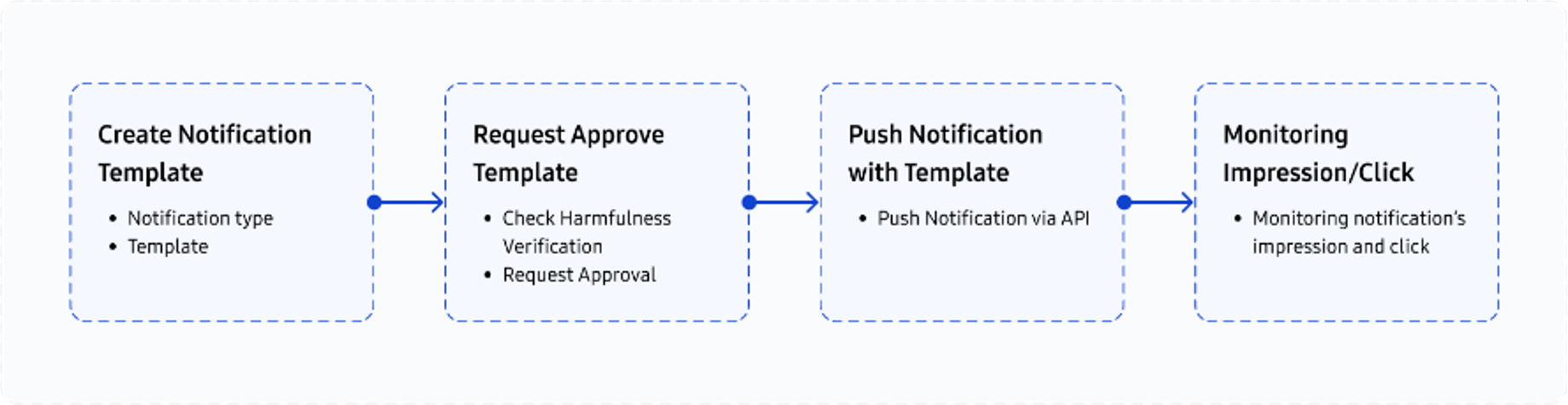
Notification Workflow
Deliver personalized push messages to Samsung Wallet users, linked to their Wallet Cards. Samsung Wallet enables authorized partners to send targeted push notifications using pre-approved message templates. This feature supports marketing, transactional, and engagement-driven use cases.
Only partners with administrative approval can access and use the Notifications feature. The Notifications tab is hidden for unauthorized accounts.
Step 1: Create Notification Template
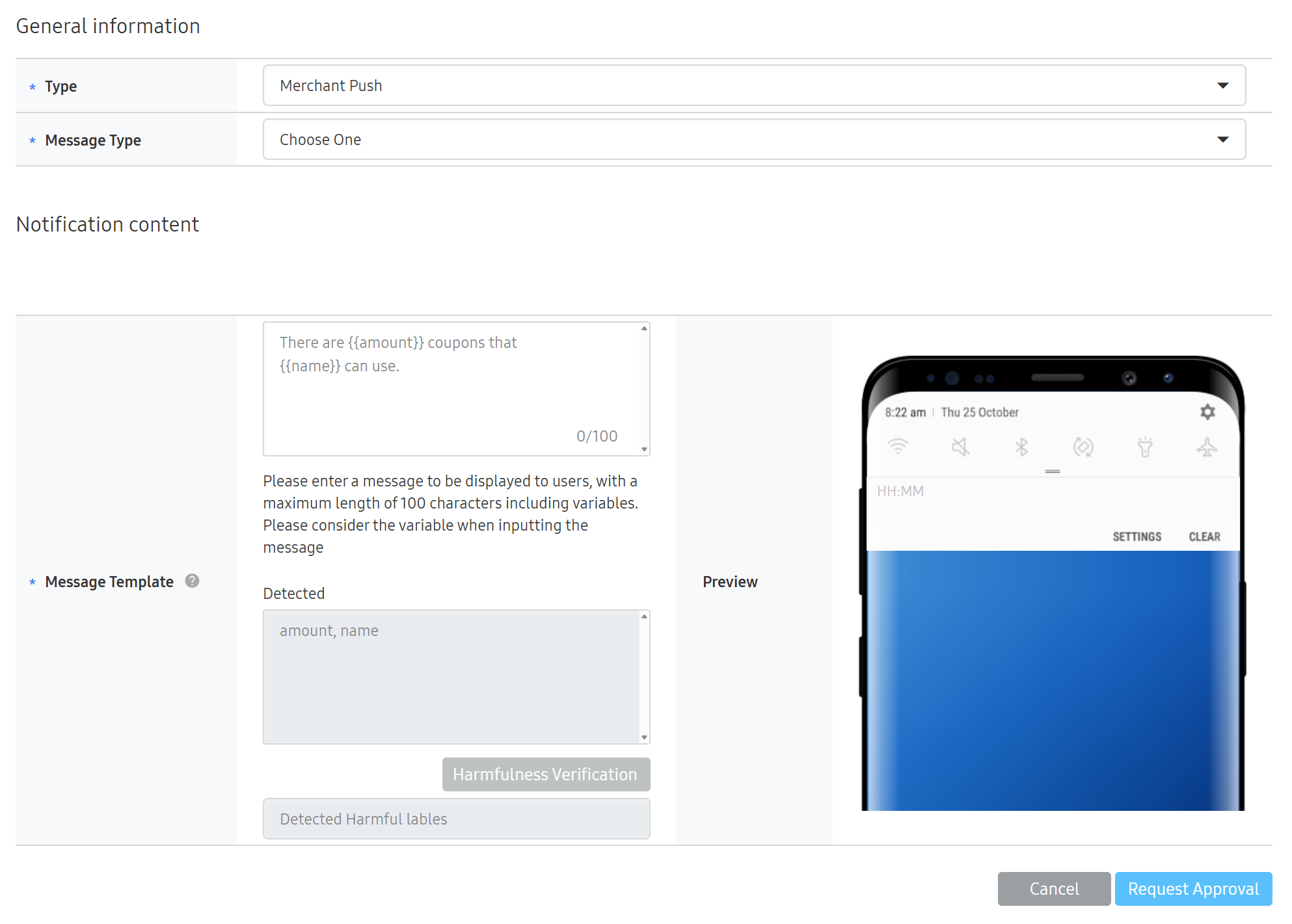
Partners can create push message templates through the Partner Portal or Notification API. Templates define the structure and content of the notification.
Type: Only Merchant Push is supported.
Message Category: Choose from Marketing or Other.
Variables: Use dynamic placeholders with {{ }} syntax
e.g., Hello {{name}}, your pass for {{event}} is ready.
If your Wallet Card supports multiple languages, a message template must be provided for each language variant.
After drafting the message:
Run Harmfulness Check to detect prohibited content.
Results: Pass or Fail
Even if failed, templates can still be submitted but may be rejected in the next step.
Step 2: Request Template Approval
Once the template is complete:
Click the Request Approval button in the portal.
An administrator will review the content.
If Rejected:
The reason is provided via system email.
Partners can revise and resubmit the template for approval.
If Approved:
The Approved Date will appear in the portal.
The template becomes eligible for use in the notification API.
Step 3: Push Notification with Template
Once a template is approved, partners can push notifications to users linked to their Wallet Cards using a secure POST API request.
Required Parameters:
Template ID – Issued after template approval
Reference ID – A unique identifier tied to the user’s Wallet Card (created during the Add to Wallet process)
Only pre-approved templates can be used in push requests.
Step 4: Monitor Impressions and Clicks
After the push is delivered, partners can track:
Impressions – Number of users who viewed the notification
Clicks – Number of interactions with the push
These metrics can be accessed through the Partner Portal dashboard, enabling performance evaluation of each campaign.
Geofence Notification
Geofence Notification enables Samsung Wallet to provide a location-triggered notification for a Wallet Card that has already been added by the user. This capability uses the locations field in Wallet Card Data (CData) and evaluates the user's device location against a configured geofence policy. When the configured condition is met, Samsung Wallet may display a notification to the user.
This feature is based on card data registered through Add to Wallet, but the notification behavior itself is performed after card enrollment. For this reason, Geofence Notification is described as a specialized notification scenario rather than as part of the core Add to Wallet flow.
At a high level, the partner provides location information and a geofenceType in the card data. Samsung Wallet uses the provided location data and service configuration to evaluate whether a location-triggered notification should be displayed on the device.
Prerequisites
The Wallet Card must already be added to Samsung Wallet.
The partner must provide valid locations data in the Wallet Card Data (CData).
The partner must provide a geofenceType for each location intended for Geofence Notification.
The user must allow location access on the device for location-triggered behavior.
Availability of Geofence Notification may depend on service policy or feature enablement.
Partner Input Example
{
  "locations": "[{\
\"lat\":37.12345,\
\"lng\":127.12345,\
\"name\":\"Store 1\",\
\"address\":\"110 Example-ro\",\
\"geofenceType\":\"100\",\
\"message\":\"Welcome to Store 1. Check your available benefits in Samsung Wallet.\"\
}]"
}
The locations field is represented as a stringified JSON array in Wallet Card Data (CData). Each location object may contain basic place information such as latitude, longitude, place name, and address. For Geofence Notification, the partner additionally provides geofenceType as a string value and may provide a notification message.
Geofence Notification Configuration
For Geofence Notification, the partner provides geofenceType as a string value in each applicable location entry. Supported values are "100", "200", "300", "400", and "500". These values indicate the geofence radius in meters, such as 100 m, 200 m, 300 m, 400 m, and 500 m. Samsung Wallet uses the provided value together with service-side configuration to apply the Geofence Notification scenario to the card.
Each value must be provided as a string in the locations entry.
Supported geofenceType values:
"100": 100 m radius
"200": 200 m radius
"300": 300 m radius
"400": 400 m radius
"500": 500 m radius
Geofence Notification Flow
Step 1: Prepare card data
The partner prepares Wallet Card Data (CData) and includes locations entries for the relevant places. For Geofence Notification, each target location entry includes geofenceType and message.
Step 2: Register the card through Add to Wallet
The partner submits the card through the Add to Wallet flow using the appropriate card template and Wallet Card Data.
Step 3: Resolve geofence policy
Samsung Wallet applies the Geofence Notification scenario associated with each geofenceType and prepares the card for location-triggered behavior on the device.
Step 4: Add the card and grant location access
The user adds the card to Samsung Wallet. To support location-triggered behavior, location access must be enabled on the device.
Step 5: Detect geofence events
The device evaluates the user's location against the configured geofence conditions, such as entry, radius, and active time range.
Step 6: Display notification
When the configured condition is satisfied, Samsung Wallet displays the notification associated with the location entry.
Notification Service APIs
Send Notification
This API sends notifications to end users who have added the wallet card.
(Required) Credential token. The token can have prefix "Bearer" as an authorization type. i.e., Bearer <credentials> * See REST API Authorization Token (JWT / JWS) for more details.
(Required) Notification object (JSON). * This field needs to be encrypted. * Refer to Card Data Token (cdata) for more details. * The value of "cty" must be set to "NOTIFICATION".
Notification Object
refIds Array of String(100)
(Required) Unique content identifier defined by the content provider.
data Object
(Required) Name-value pair for use in notification template.
Requests cannot or will not be processed due to a client error.
401 Unauthorized
Authorization token is invalid or expired.
404 Not Found
Targeted notification job does not exist or does not belong to the requested card.
500 Internal Server Error
The server encountered an unexpected condition that prevented it from fulfilling the request.
Adding Notification Templates
In general, card notification creation is possible through the Samsung Wallet Partners Portal. However, a server API is provided for cases where it is necessary to create a large number of card notifications. Card notifications created through API can also be checked and managed in the same way on the Samsung Wallet Partners Portal.
[Request]
Type
Value
Description
Method
POST
URL
/partner/v1/card/template/{cardId}/notification
Header
Authorization String(1024)
(Required) Credential token. The token can have prefix "Bearer" as an authorization type. i.e., Bearer <credentials> * See REST API Authorization Token (JWT / JWS).
x-smcs-partner-id String(32)
(Required) Partner ID.
x-request-id String(32)
(Required) Request identifier. Random generated UUID string.
Path Parameters
cardId String(32)
(Required) The wallet card identifier granted through the Samsung Wallet Partners Portal. * The identifier is needed when updating a specific card template.
Body parameters
ntemplate Object
(Required) Actual payload data in basic JSON format to establish the communication between partners and Samsung Wallet. This must be in the secure JWT (JSON Web Token) format. * See the chapter Card Data Token (cdata) for more details.
Payload Object
type String(20)
(Required) Notification Type (M: Merchant Push, G:Geo Push)
messageType String(20)
(Required) Purpose of Notification (S: Service, M: Marketing)
messageDetails[] Array Of Object
(Required) Container of notification message..
messageDetails[]. languageCode String(20)
(Required) Default notification language code, e.g. en, ko.
messageDetails[].message String(500)
(Required) Notification message.
forceSaveYn String(10)
(Optional) Sets whether to save when harmfulness is detected. This must be set to either 'Y' or 'N'. * Default: 'N'.
Requests cannot or will not be processed the request due to something that is perceived to be a client error.
401
401 Unauthorized
Authorization token is invalid or expired.
500
500 Internal Server Error
503
503 Service Unavailable
Get Notification Templates
[Request]
Type
Value
Description
Method
GET
URL
/partner/v1/card/template/{cardId}/notification
Headers
Authorization String(1024)
(Required) Credential token. The token can have prefix "Bearer" as an authorization type. i.e., Bearer <credentials> * See REST API Authorization Token (JWT / JWS).
x-smcs-partner-id String(32)
(Required) Partner ID.
x-request-id String(32)
(Required) Request identifier. Random generated UUID string.
Path Parameters
cardId String(32)
(Required) The wallet card identifier granted through the Partner Portal. * The identifier is needed when updating a specific card template.
(Required) Credential token. The token can have prefix "Bearer" as an authorization type. i.e., Bearer <credentials> * See REST API Authorization Token (JWT / JWS).
x-smcs-partner-id String(32)
(Required) Partner ID.
x-request-id String(32)
(Required) Request identifier. Random generated UUID string.
Path Parameters
cardId String(32)
(Required) The wallet card identifier granted through the Partner Portal. * The identifier is needed when updating a specific card template.
Query Parameters
notificationId String(32)
(Optional) If specified, statistics are returned only for the specified notification. If not specified, aggregated statistics for all notifications of the card are returned.
start Timetamp(ms)
(Required) Start Date(Unix timestamp in milliseconds)
end Timestamp(ms)
(Required) End Date(Unix timestamp in milliseconds)
Requests cannot or will not be processed the request due to something that is perceived to be a client error
401
401 Unauthorized
Authorization token is invalid or expired.
500
500 Internal Server Error
503
503 Service Unavailable
Manage Your Cookies
We use cookies to improve your experience on our website and to show you relevant
advertising. Manage you settings for our cookies below.
Essential Cookies
These cookies are essential as they enable you to move around the website. This
category cannot be disabled.
Company
Domain
Samsung Electronics
developer.samsung.com, .samsung.com
Analytical/Performance Cookies
These cookies collect information about how you use our website. for example which
pages you visit most often. All information these cookies collect is used to improve
how the website works.
Company
Domain
Samsung Electronics
.samsung.com
Functionality Cookies
These cookies allow our website to remember choices you make (such as your user name, language or the region your are in) and
tailor the website to provide enhanced features and content for you.
Company
Domain
Samsung Electronics
developer.samsung.com, google.account.samsung.com
Preferences Submitted
You have successfully updated your cookie preferences.