The Samsung Pay SDKs allow you to integrate wallet features into your Android-based app to enable card transactions. The Samsung Pay SDKs offer 2 components:
Samsung Pay SDK for Android for implementing apps using the native Android OS
Samsung Pay SDK for Flutter for implementing apps using Google's Flutter framework
The Samsung Pay SDK for Android and Flutter both provide the same Samsung Pay features that give customers the option of paying for products and services with Samsung Pay using a card in Samsung Wallet.
The following sections provide all the information you need to integrate the Samsung Pay SDK for Android or Flutter:
Gives step-by-step instructions for checking that the device running your app supports Samsung Pay. You must always run this check before using any Samsung Pay features.
Gives step-by-step instructions for coding the card transaction functionalities needed to allow the customer to pay for their in-app purchases with Samsung Pay.
After the customer has authorized the payment in the Samsung Wallet app, send the payment credentials you receive from the wallet to your payment gateway (PG) for processing.
Architecture
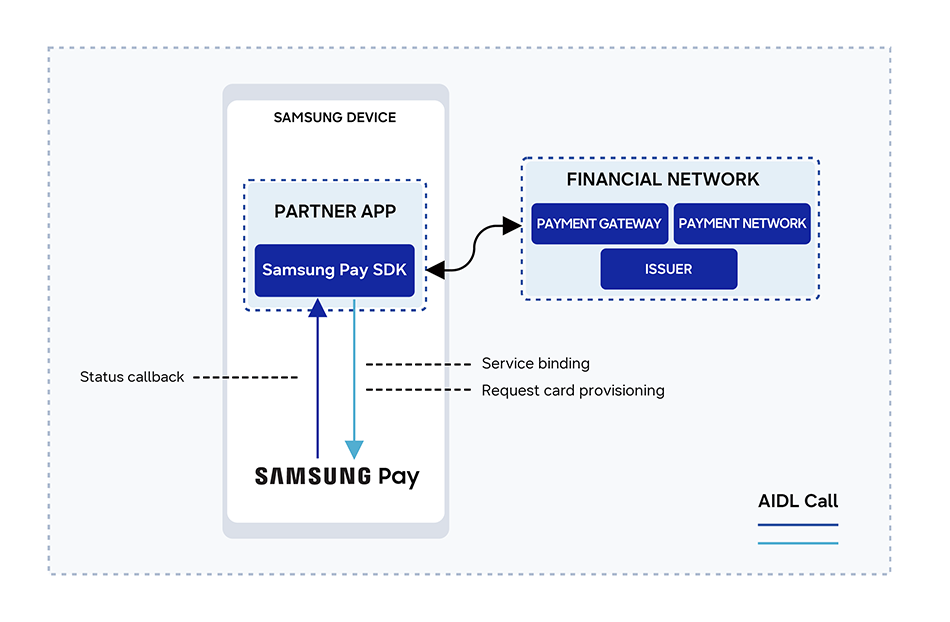
The following diagram shows a high-level architecture of the general interactions between Samsung Pay and your app.
The key components involved are:
Partner app: Merchant app for making payments
Samsung Pay SDK: Samsung Pay SDK for Android or Flutter, integrated into the partner app for direct communication with Samsung Pay
Samsung Pay: Samsung payment service that creates transactions using the payment methods stored in Samsung Wallet
Financial network: Payment gateways, acquirers, card associations, and issuers that participate in transaction processing under agreement with the merchant
Manage Your Cookies
We use cookies to improve your experience on our website and to show you relevant
advertising. Manage you settings for our cookies below.
Essential Cookies
These cookies are essential as they enable you to move around the website. This
category cannot be disabled.
Company
Domain
Samsung Electronics
developer.samsung.com, .samsung.com
Analytical/Performance Cookies
These cookies collect information about how you use our website. for example which
pages you visit most often. All information these cookies collect is used to improve
how the website works.
Company
Domain
Samsung Electronics
.samsung.com
Functionality Cookies
These cookies allow our website to remember choices you make (such as your user name, language or the region your are in) and
tailor the website to provide enhanced features and content for you.
Company
Domain
Samsung Electronics
developer.samsung.com, google.account.samsung.com
Preferences Submitted
You have successfully updated your cookie preferences.