To complete the payment, your payment gateway (PG) handles one of 2 types of tokens: network tokens with a direct merchant server-to-PG connection or gateway tokens with an indirect connection through the Samsung PG Interface server. Samsung Pay supports both token types, so you must check with your PG which token type they use.
The essential difference between the token types is who decrypts the token information: network tokens require that you work with the PG to handle decryption, whereas gateway token decryption is handled by the PG via the Samsung PG Interface server.
To use the W3C Payment Request service on your website, your customers must:
Use a compatible browser (Samsung Internet or Chrome)
Use a Samsung Galaxy–class smartphone running the Samsung Wallet app
Meet the following minimum version requirements:
Samsung Wallet app: version 2.8.xx or later
Samsung Internet: version 5.4 or later
Google Chrome: version 61 or later
Token modes
Depending on your PG, the payment process uses either network or gateway tokens:
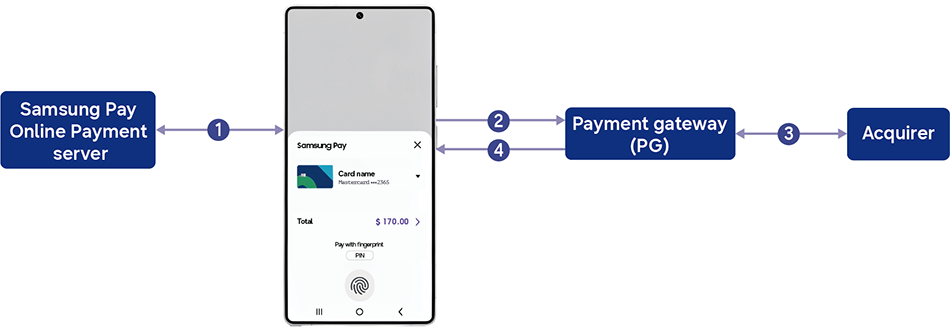
Direct network token
The following figure illustrates the handling of a direct network token.
The certificate signing request (CSR) you have provided when creating your service in the Samsung Pay Portal has originated from your PG. When Samsung Pay encrypts the payment information into a network token, your PG has the private key to decrypt it.
The customer selects Samsung Pay as the payment method during checkout on your website and Samsung Pay requests partner verification from the Samsung Pay Online Payment server.
Samsung Pay passes the encrypted payment information (network token) to the PG.
Applying the private key, the PG decrypts the payment information structure and processes the payment through the acquirer.
Upon receiving authorization or rejection, the PG notifies your website through its PG SDK.
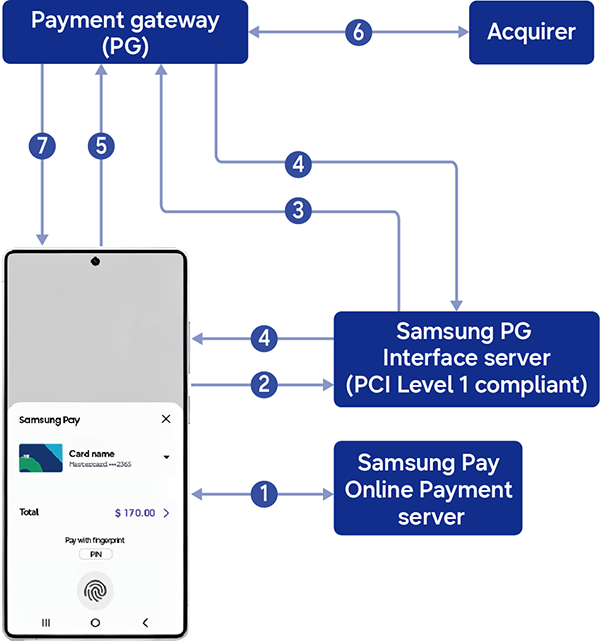
Indirect gateway token:
The following figure illustrates the handling of a gateway token.
The customer selects Samsung Pay as the payment method during checkout on your website and Samsung Pay requests partner verification from the Samsung Pay Online Payment server.
Samsung Pay passes the encrypted payment information (gateway token) and the merchant ID to the Samsung PG Interface server.
The Samsung PG Interface server sends a transaction authorization request to the PG on your behalf. The PG authenticates the merchant ID before generating a transaction reference ID.
The transaction reference ID is returned to your server through the Samsung PG Interface server.
Your server submits the reference ID to the PG for payment process execution.
The PG continues payment processing through the acquirer.
Upon receiving authorization or rejection, the PG notifies your website.
Manage Your Cookies
We use cookies to improve your experience on our website and to show you relevant
advertising. Manage you settings for our cookies below.
Essential Cookies
These cookies are essential as they enable you to move around the website. This
category cannot be disabled.
Company
Domain
Samsung Electronics
developer.samsung.com, .samsung.com
Analytical/Performance Cookies
These cookies collect information about how you use our website. for example which
pages you visit most often. All information these cookies collect is used to improve
how the website works.
Company
Domain
Samsung Electronics
.samsung.com
Functionality Cookies
These cookies allow our website to remember choices you make (such as your user name, language or the region your are in) and
tailor the website to provide enhanced features and content for you.
Company
Domain
Samsung Electronics
developer.samsung.com, google.account.samsung.com
Preferences Submitted
You have successfully updated your cookie preferences.