Identity verification (ID&V) is the process of confirming that an individual or entity is legitimate. In mobile payments, ID&V ensures that only the rightful cardholder can add their payment card to a digital wallet.
The App-to-App ID&V service is an ID&V method supported by Samsung Pay for verifying the customer's identity for new card enrollment. When a customer is in the Samsung Wallet app, wanting to enroll a new card, Samsung Wallet launches the card issuer app asking the issuer to verify that the card belongs to the customer.
During the verification process, a token that Samsung Wallet has created for the card is activated. There are 2 ways to activate the token after the customer has been verified:
Use your backend server to call the token service provider directly.
Use your backend server to generate an authorization code and let Samsung Wallet handle the activation with the code.
The following sections provide all the information you need to integrate App-to-App ID&V:
Gives step-by-step instructions for supporting app-to-app ID&V requests from Samsung Wallet.
User experience
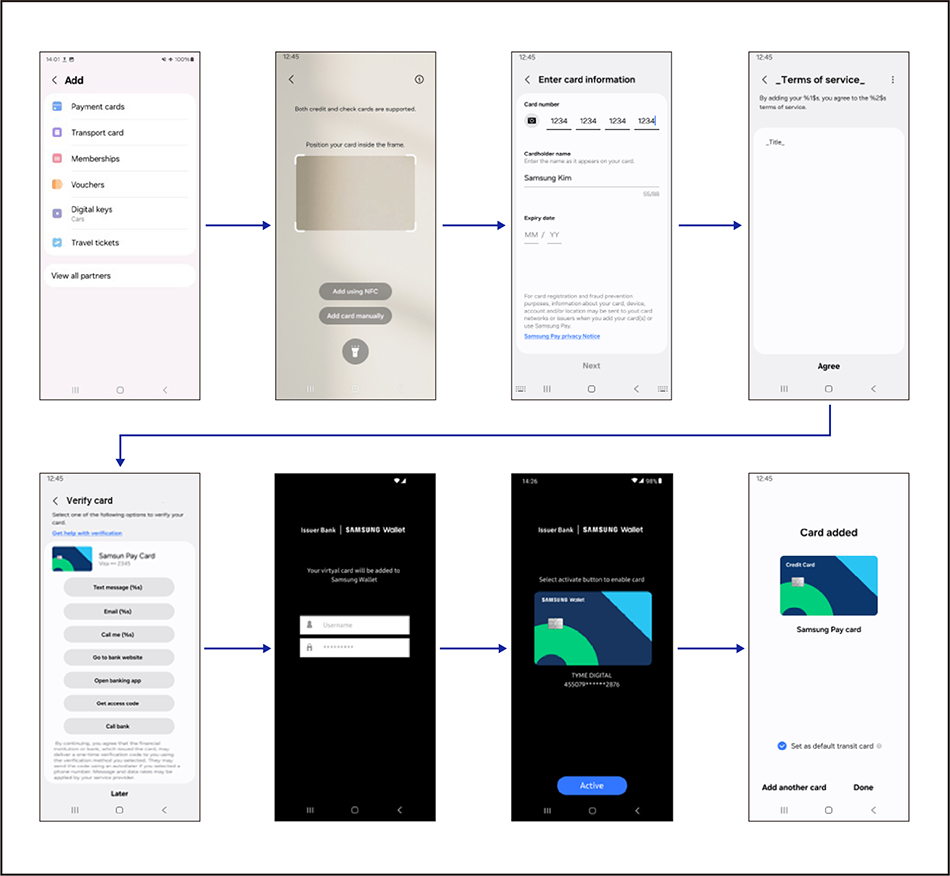
The following figure illustrates the user experience of being verified by App-to-App ID&V as part of the Samsung Wallet app's card enrollment process.
In the Samsung Wallet app, the customer selects the type of card they want to enroll.
The customer provides the card details manually or through Near Field Communication (NFC), and agrees to the terms of service.
The customer selects the verification method they want to use.
The Samsung Wallet app opens the issuer app where the customer logs in and activates the card for future use in online purchases.
The Samsung Wallet app displays the enrolled card.
Service flow
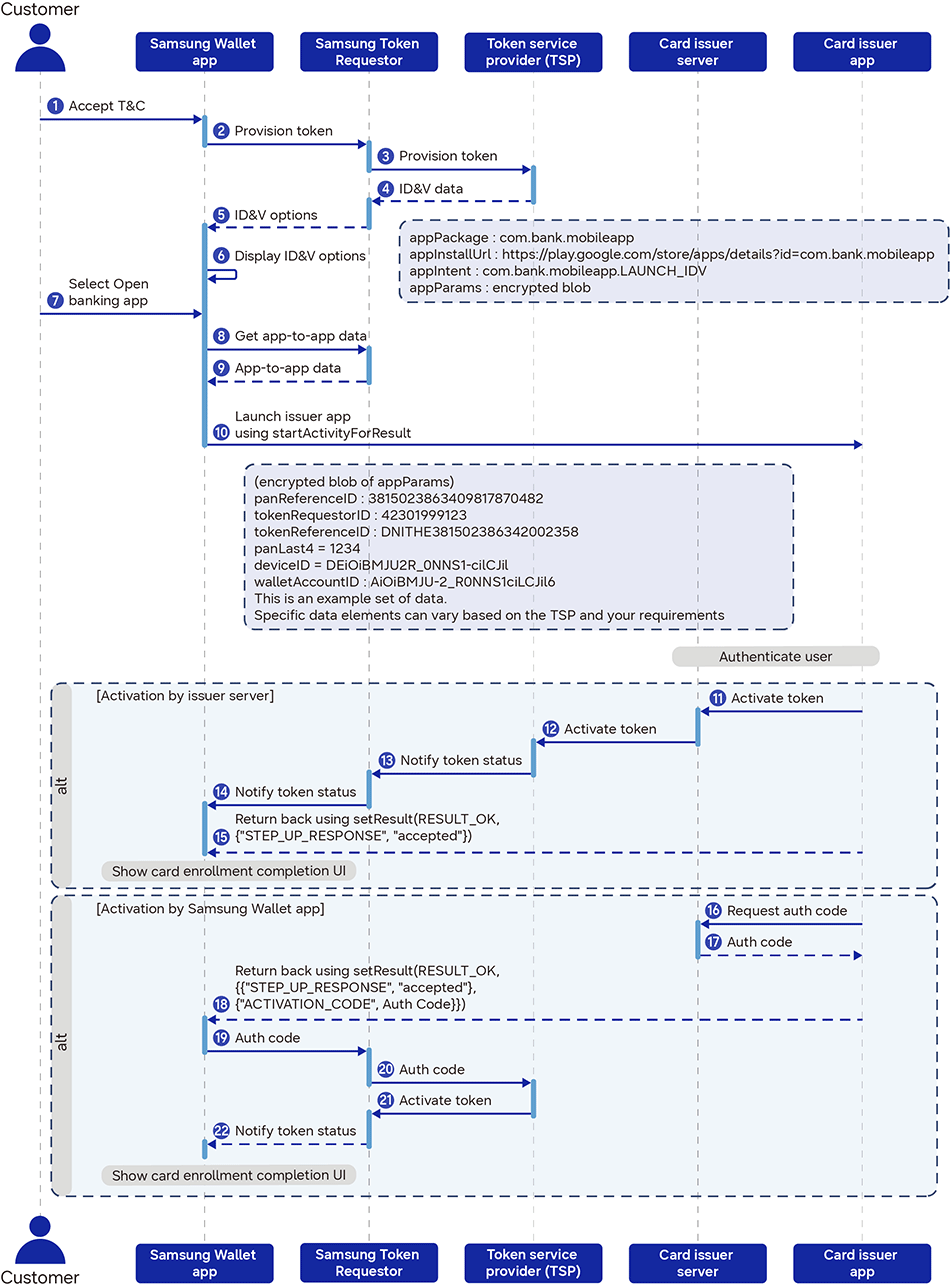
The following diagram illustrates the overall App-to-App ID&V flow.
The customer accepts the Samsung Wallet app's terms and conditions.
Samsung Wallet sends a token provisioning request to Samsung Token Requestor.
Samsung Token Requestor sends a token provisioning request to the token service provider (TSP).
The TSP returns the data related to the customer's identity verification to Samsung Token Requestor.
Samsung Token Requestor sends the identity verification options to Samsung Wallet.
The Samsung Wallet app displays the identity verification options to the customer.
The customer selects the Open banking app option.
Samsung Wallet requests app-to-app data from Samsung Token Requestor.
Samsung Token Requestor returns the app-to-app data to Samsung Wallet.
The Samsung Wallet app launches the issuer app with Android intent and the issuer app authenticates the customer.
If the card token is activated by the card issuer - start
The issuer app requests the issuer server to activate the token.
The issuer server contacts the TSP for the activation.
The TSP activates the token and notifies Samsung Token Requestor of the token status.
Samsung Token Requestor notifies Samsung Wallet of the token status.
The issuer app returns the identity verification result to Samsung Wallet, and the Samsung Wallet app notifies the customer that the card enrollment is complete. If the card token is activated by the card issuer - end
If the card token is activated by Samsung Wallet - start
The issuer app requests the issuer server for an authorization code.
The issuer server returns the authorization code to the issuer app.
The issuer app returns the identity verification result and the authorization code to Samsung Wallet.
Samsung Wallet sends the authorization code to Samsung Token Requestor.
Samsung Token Requestor sends the authorization code to the TSP.
The TSP activates the token and notifies Samsung Token Requestor of the token status.
Samsung Token Requestor notifies Samsung Wallet of the token status, and the Samsung Wallet app notifies the customer that the card enrollment is complete. If the card token is activated by Samsung Wallet - end
Manage Your Cookies
We use cookies to improve your experience on our website and to show you relevant
advertising. Manage you settings for our cookies below.
Essential Cookies
These cookies are essential as they enable you to move around the website. This
category cannot be disabled.
Company
Domain
Samsung Electronics
developer.samsung.com, .samsung.com
Analytical/Performance Cookies
These cookies collect information about how you use our website. for example which
pages you visit most often. All information these cookies collect is used to improve
how the website works.
Company
Domain
Samsung Electronics
.samsung.com
Functionality Cookies
These cookies allow our website to remember choices you make (such as your user name, language or the region your are in) and
tailor the website to provide enhanced features and content for you.
Company
Domain
Samsung Electronics
developer.samsung.com, google.account.samsung.com
Preferences Submitted
You have successfully updated your cookie preferences.