The Tizen Studio, which is the IDE included with the Samsung TV SDK, provides a developer-friendly environment and tools to improve development quality and minimize development time. This topic describes the main features of the Tizen Studio.
The Tizen Studio Web Editor is a powerful tool for creating and modifying source code. It supports:
The Web Editor provides support for JavaScript, HTML, and CSS file editing.
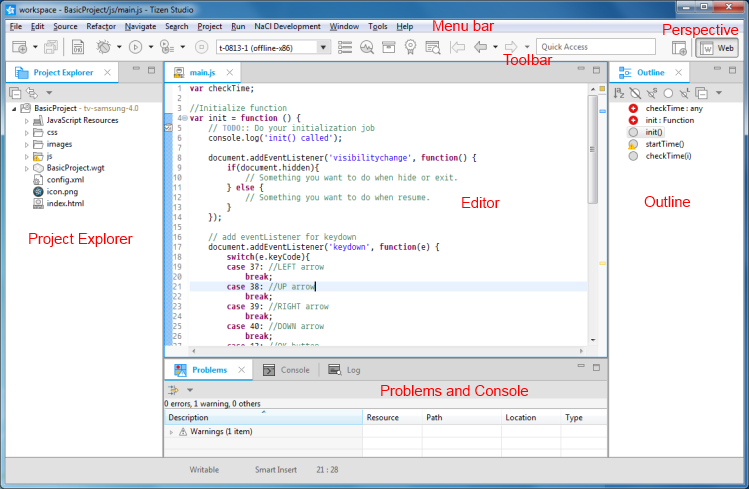
The following figure illustrates the parts of the Tizen Studio interface.
The Tizen Studio interface is composed of a set of views:
"Menu bar" provides functionalities to create or modify your project or application.
"Toolbar" provides quick access to frequently-used functionalities in the menu bar.
"Perspective" buttons allow you to open and change the editing perspective of the Tizen Studio. For TV application development, use the "Web" perspective.
"Project Explorer" view displays a hierarchical view of the opened projects and their resources.
"Editor" view is where you edit HTML, CSS, JS, and XML code.
"Outline" view gives a structural summary of the file displayed in the editor.
"Problems" view displays errors and warnings for the selected project.
"Console" view displays the JavaScript logs.
Customizing the IDE Interface
You can customize the Tizen Studio by modifying which views are shown.
To add more views:
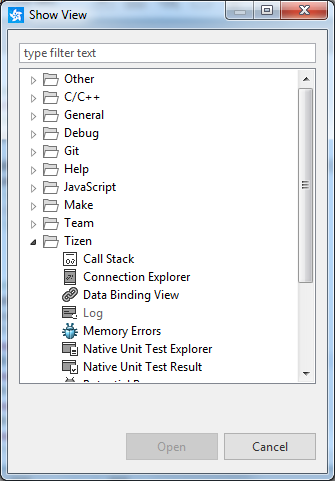
In the Tizen Studio menu, select "Window > Show View > Other".
The "Show View" dialog opens.
Select the view you want and click "OK".
Adjust the position of the view by dragging and dropping it into any of the panes in the Tizen Studio. To remove a view, click "x" on its title tab, or right-click the title tab and select "Close".
Setting IDE Preferences
The Tizen Studio Web Preferences tool allows you to set the Web preferences, which are a set of options, such as resources, file colors, version control options, and code styles. The preferences allow you to configure the workspace to optimize your working environment.
We use cookies to improve your experience on our website and to show you relevant
advertising. Manage you settings for our cookies below.
Essential Cookies
These cookies are essential as they enable you to move around the website. This
category cannot be disabled.
Company
Domain
Samsung Electronics
developer.samsung.com, .samsung.com
Analytical/Performance Cookies
These cookies collect information about how you use our website. for example which
pages you visit most often. All information these cookies collect is used to improve
how the website works.
Company
Domain
Samsung Electronics
.samsung.com
Functionality Cookies
These cookies allow our website to remember choices you make (such as your user name, language or the region your are in) and
tailor the website to provide enhanced features and content for you.
Company
Domain
Samsung Electronics
developer.samsung.com, google.account.samsung.com
Preferences Submitted
You have successfully updated your cookie preferences.