For Samsung In-App Purchase (IAP) subscriptions, you can test their offering, purchase, free trials, lower and regular tier pricing, automatic payments, manual subscription cancellation, and repurchase.
-
Set up the beta/non-beta test environment
-
Purchase a subscription
If a tester purchases a subscription with a free trial or introductory pricing and the same tester purchases the same subscription again, the free trial and introductory pricing will not apply again.
To test free trial or introductory pricing again, either re-register a new subscription in Seller Portal (for example, register the subscription with a different name) or use a different tester.
-
Verify the subscription status after initial purchase
NoteWhen testing in India, the user's extension status is checked every 10 minutes.

-
Test auto-payment
- Auto-payments are processed 12 times, every 10 minutes.
- Verify the regular-tier price appears in each auto-payment email
- Verify emails arrive every 10 minutes on the hour

-
Test automatic payment failure
After the test starts, automatic payments are made every 10 minutes for a total of 12 times. If you remove the license tester account at any time before the 12th automatic payment is completed, subsequent automatic payments fail. This simulates real-world scenarios such as credit card expiration during automatic recurring payments.
- Remove the license tester account before the 12th automatic payment is completed. In Seller Portal, go to your profile (click the Profile button at top right), go to the License Test section and remove the license tester from the list.
- Verify the next automatic payment fails.
The outcome of the payment failure depends on whether a grace period is configured for the subscription.
NoteDuring testing, one-day grace periods are accelerated to 10 minutes and three-day grace period are accelerated to 30 minutes.
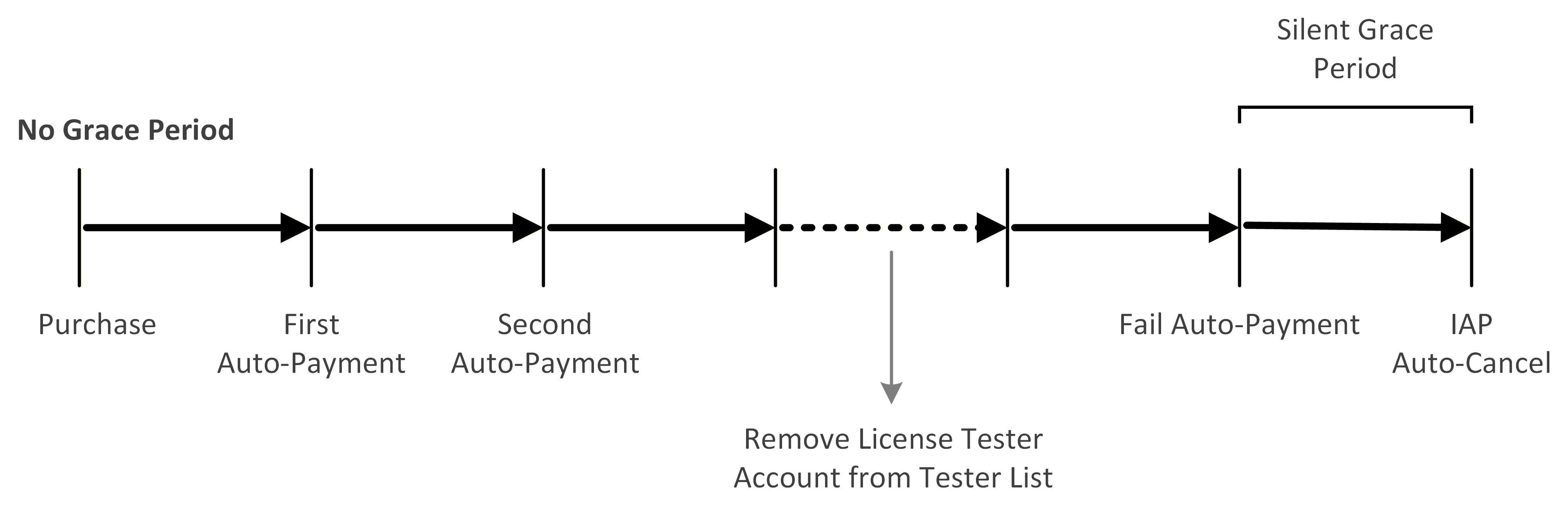
No grace period configured
- When automatic payment fails, the subscription enters the default silent grace period (10 minutes).
- After the silent grace period ends and the automatic payment fails again, the subscription is immediately cancelled.
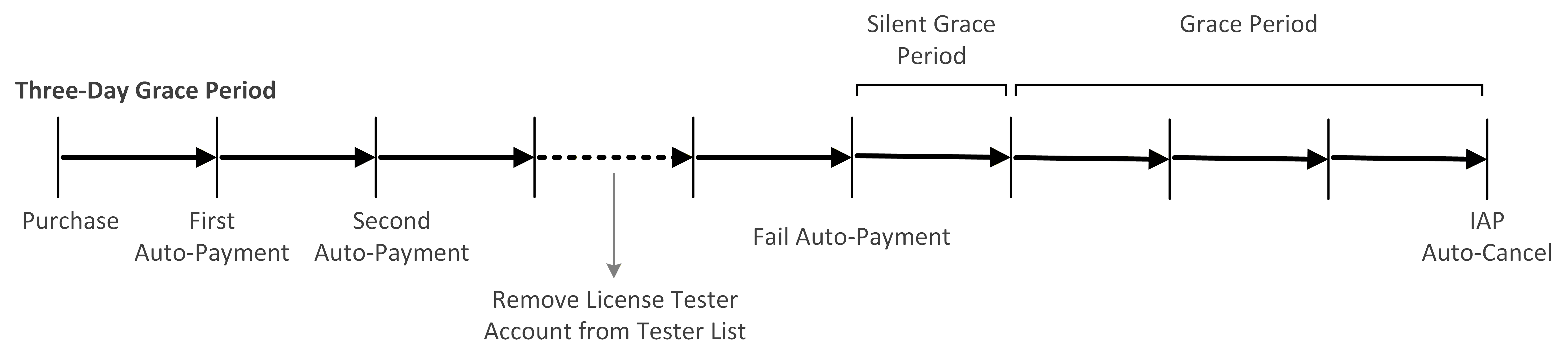
Grace period set to 3 days
- When automatic payment fails, the subscription enters the default silent grace period (10 minutes).
- After the silent grace period ends and the automatic payment fails again, the subscription enters the grace period (30 minutes).
- If the cause of the automatic payment failure is not resolved during the grace period, the subscription is immediately cancelled after the grace period ends.
Grace period set to 3 days, payment failure resolved during grace period
- When automatic payment fails, the subscription enters the default silent grace period (10 minutes).
- If the cause of the automatic payment failure is resolved during the grace period (re-registering the license tester account counts as resolving the cause), the next automatic payment succeeds.
- After the cause is resolved, automatic payments continue, up to 12 total.
- After 12 successful automatic payments, the subscription is cancelled once the silent grace period and grace period have ended.

-
Test manual cancellation
- On the test device, in Galaxy Store, go to Menu > Subscription > [select subscription] > Unsubscribe at any time before auto-cancellation
- Verify a cancellation email is sent
-
Test re-subscription
A cancelled subscription expires at the end of the current 10-minute test cycle (for example, hh:00, hh:10, hh:20). You can re-subscribe before it expires.
- To re-subscribe, on the test device, in Galaxy Store, go to Menu > Subscription > [select cancelled subscription] > Resubscribe.