After you've published your app in Galaxy Store, take advantage of opportunities to promote your app and track app data.
Promote Your App and Track App Data
You can increase the number of downloads of your app by promoting your app. You can submit your app to be featured in the Benefits tab, pre-register your app, submit your app to be featured in a Galaxy Store editorial, issue discounts, promote your app in social media, and use the Galaxy Store badge.
You can also track app data using Galaxy Store Statistics and third-party attribution platforms integrated with Galaxy Store.
Galaxy Store Benefits tab
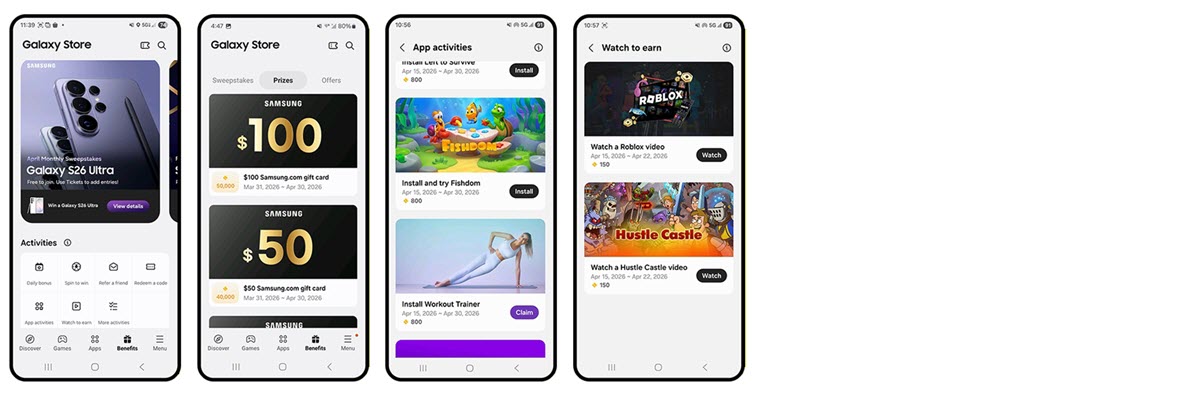
Galaxy Store Benefits is a rewards program built into Galaxy Store for Galaxy device users in the United States. By featuring your app or game in the Benefits tab, you can reach an engaged, motivated audience and drive meaningful growth in your installs and daily active users.
What is the Benefits tab?
The Benefits tab is a dedicated section inside Galaxy Store where users can participate in sweepstakes for free and earn virtual Gems and Tickets by completing daily activities such as exploring featured apps and games, checking in, and watching videos. Users can redeem Gems for Galaxy Store coupons and Samsung.com digital gift cards, and use Tickets for additional entries to the weekly and monthly sweepstakes for a chance to win Samsung devices.
Because every activity in the Benefits tab is designed to keep users coming back day after day, the program creates a highly engaged audience that is primed to discover, install, and explore apps.
How it helps your app or game
When your app or game is featured in the Benefits tab, it is placed in front of users who are actively participating in store activities—not passive browsers. These users are highly motivated to install and engage, which translates to:
Higher-quality installs: users arrive with intent, not just curiosity.
Increased daily installs: Benefits tab activities can dramatically increase the number of daily installs for your app or game.
Sustained engagement: because the program incentivizes users to return every day, your app benefits from ongoing visibility rather than a one-time spike.
Custom tasks (coming soon): in the near future, you will be able to define specific in-app actions—such as completing a level, making a purchase, or reaching a playtime or in-game milestone — as tasks that users can complete to earn Gems, letting you drive the exact behaviors that matter most to your app's growth.
Availability
The Benefits tab is currently available to Galaxy device users in the United States. The Galaxy Store team reviews and selects apps and games to be featured in the program. If you are interested in having your app or game featured or being a selected partner for Custom tasks, please submit a 1:1 Support request with details about your app or game—including its category, target audience, and any relevant performance metrics—so the Galaxy Store team can review your submission.
Pre-Registration
Pre-Registration is a listing of your game in Galaxy Store before it's released and appears in the Pre-register tab of the Games section. Pre-Registration allows you to promote your upcoming release, offer special incentives to customers who pre-register for your game, and automatically downloads the game (over Wi-Fi) when it's released.
Galaxy Store editorial
Showcase your app or theme in an editorial in the Discover tab of Galaxy Store, available to users in the U.S., the UK, and South Korea. The Discover tab is where discovery meets inspiration, bringing users the best apps, games, themes and original stories in ways that resonate with their daily lives, right to their fingertips. Providing users with curated recommendations on the latest trends, Samsung exclusive benefits, seasonal events, tips, and more, the editorials combine storytelling and visuals to enrich user experience and showcase developer innovation. Using the App Promotion tab in Seller Portal, app publishers can request that their app be featured in the Discover tab in Galaxy Store.
Discounts
For paid apps, you can reduce the price of your app for a set period of time. Run a limited-time promotion or seasonal discount to attract new customers. See Discounting App Price for more information.
For in-app items, you can update the prices in Seller Portal using real-time item management, which allows you to publish price changes without having to go through the Seller Portal review process. Unlike discounts for paid apps, you cannot set an expiration date for the discount of an in-app item. If you want to run a limited-time promotion, you must manually reset the price in Seller Portal at the end of the promotion. See also Management of In-App Products for more information.
Galaxy Store badge
Galaxy Store badge is an image and a link to your app details page that you can use in your content, making it easy for your customer to download your app through Galaxy Store. The badge image is available in over 30 languages and can be downloaded from Seller Portal (go to Promotion > Badges, then select Download Badge) .
Third-Party attribution platforms
If you want to use a third-party attribution platform to track app data, Galaxy Store is integrated with:
Do you use another platform? Contact us by submitting a request with more information.
Galaxy Store Statistics
Galaxy Store Statistics (GSS) is a free and exclusive tool that can be used to track and monitor Galaxy Store app performance and metrics like downloads, conversion, subscription, top SEO keywords, and attribution channels. GSS also provides user acquisition reports that measure user attribution and breaks down the numbers by channel, source, keywords, and featured placement (attribution from Galaxy Store banners or icons).
Information about the GSS system can be found in the online user guide (must be logged in to Seller Portal to view).
Galaxy Store Developer API
Manage apps, manage in-app items, and check app statistics programmatically. Use the Content Publish API to view, modify, submit, and change the status of apps registered in Seller Portal. Use the IAP APIs to view, register, modify, and remove items, view payments and refunds, and cancel, refund, revoke, or check the status of subscription items. Use the GSS Metric API to get statistics about apps registered in Galaxy Store.
Manage Your Cookies
We use cookies to improve your experience on our website and to show you relevant
advertising. Manage you settings for our cookies below.
Essential Cookies
These cookies are essential as they enable you to move around the website. This
category cannot be disabled.
Company
Domain
Samsung Electronics
developer.samsung.com, .samsung.com
Analytical/Performance Cookies
These cookies collect information about how you use our website. for example which
pages you visit most often. All information these cookies collect is used to improve
how the website works.
Company
Domain
Samsung Electronics
.samsung.com
Functionality Cookies
These cookies allow our website to remember choices you make (such as your user name, language or the region your are in) and
tailor the website to provide enhanced features and content for you.
Company
Domain
Samsung Electronics
developer.samsung.com, google.account.samsung.com
Preferences Submitted
You have successfully updated your cookie preferences.