Samsung Checkout offers an optimized purchase experience for your users on Samsung TVs. The user can quickly and safely register a payment method and make frictionless payments repeatedly within the TV environment. In addition, Samsung Checkout provides a comprehensive global monetization platform, which allows you to integrate various business models and promotional campaigns into your services.
The TV-optimized purchase experience provides the user a quick and simple 3-step checkout, once a payment method is registered. The checkout requires only number-centric information to be entered, making it easy to use with a TV remote control. Users can register their payment method directly on the TV or through a mobile phone.
To use Samsung Checkout, the user needs:
TV: Samsung Smart TV, 2016 or later model supporting Tizen (excluding Evolution Kit)
Payment method: Credit or debit card, PayPal, or Samsung Pay (in Korea, United States)
Security: Tizen SecureIME, 2nd-screen card registration (mobile or PC)
Account: Samsung Account (for sharing account and payment information with Galaxy phones)
ImportantA Samsung Account is mandatory for using Samsung Checkout. Samsung Checkout assumes that the user is logged in to Samsung Account at all times.
Samsung Checkout provides :
One solution for payment execution :
✔ One solution supports all functions from payment operation
✔ Operate automatically settlement and payout
Strong security Payment solution
✔ Acquire PCI-DSS certification and follow regulation each of countries (PSD2)
✔ Following PSD2 regulantion and GDPR
Deliver the coupon/promotional code in various ways of distribution with easiest UX
✔ Issue coupons for promotion
Provide DPI (Digital Product Inventory) System
✔ Create and manage service items
✔ Check the status of sales amounts and transaction scale
✔ Refund and cancel subscription
ImportantAll application data that is saved locally on a TV is deleted when the application is deleted from that TV. If the user's purchase history is saved only in the TV storage and not remotely, and the user deletes and reinstalls the application, all application settings and content are removed, including purchased content. If your application saves purchase information in the TV storage only, inform the user that uninstalling the application deletes their purchased content.
The DPI portal provides functions, such as "Purchase History Unapply" and "Refund", to help you address situations when your customer inadvertently deletes application data. Before proceeding with the unapply and refund processes, you must contact a Samsung representative by going to "Samsung Apps TV Seller Office > Support" and creating a "1:1 Q&A" support ticket.
Samsung Checkout Purchase Process
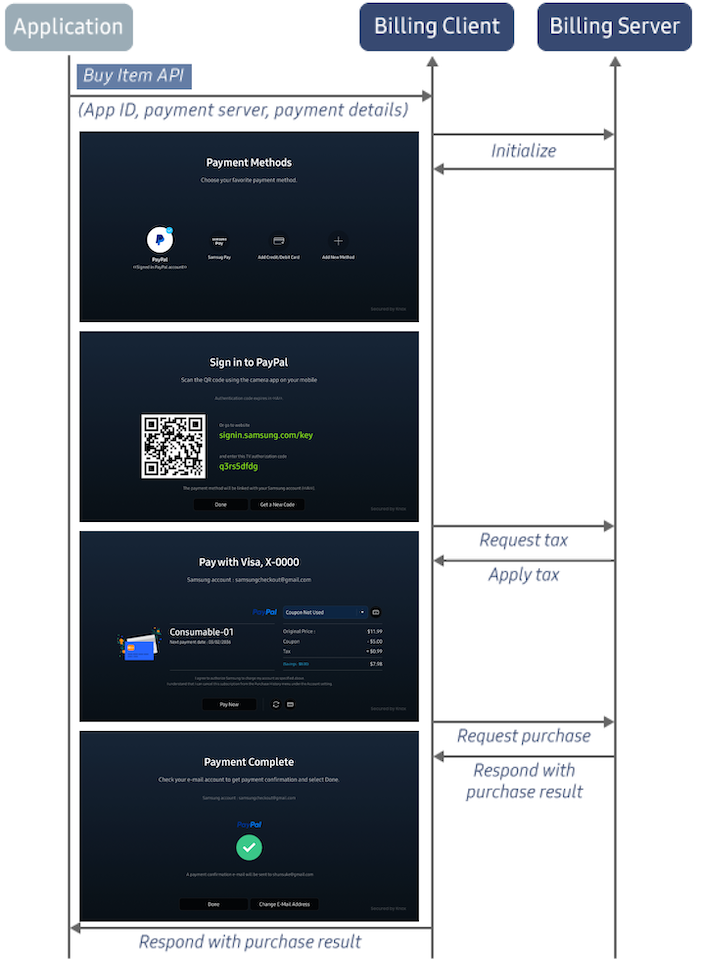
When a user wants to purchase a product on your application, Samsung Checkout provides a common purchase GUI, which identifies the user and confirms first the purchase and then the purchase completion. After the user completes the purchase, Samsung Checkout returns the purchase result to your application.
Product, Purchase, and Payment Management
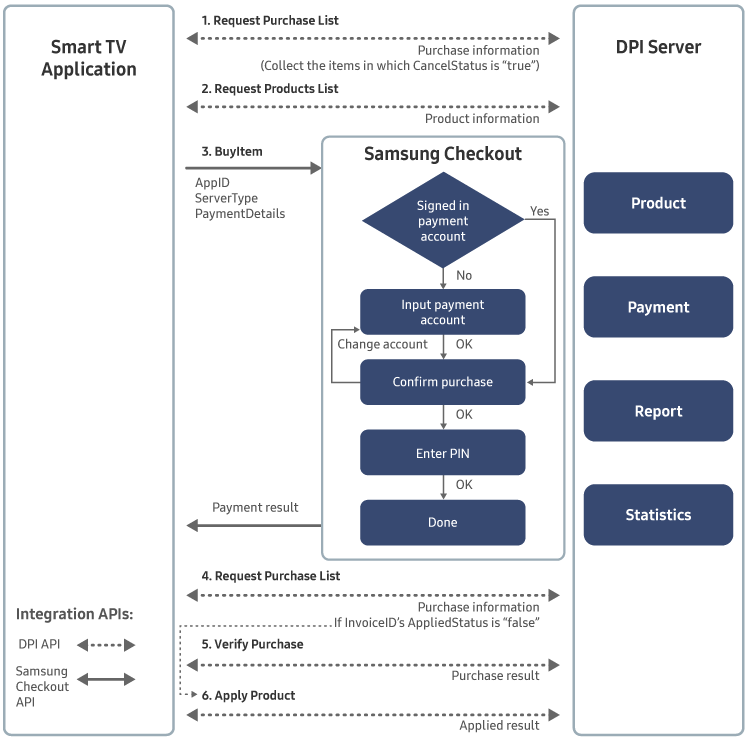
The following figure illustrates how you can use Samsung Checkout and the information in the DPI server to manage in-app purchases and payments in your application.
Apply the product using an Apply Product API request, and send the application result to the server.
Payment Flow with Dynamic Products
If a partner already has a CMS server which manages products and prices, and frequent changes to product information are required, the partner and Samsung can discuss the use of dynamic products when they integrate Samsung Checkout. If they agree on that products and prices will be managed by the partner's own CMS instead of Samsung’s DPI, the partner needs to register a representative item on the DPI so that the Samsung Checkout system can display legally-required information on Samsung Smart TV App/Game store.
However, the partner does not need to register each product on the DPI that they sell in their application. They should build and operate their own CMS to manage product information, including prices, and provide the rest of the API for verification of purchase requests.
The following figure shows the data flow of the initialization stage in a payment process with dynamic products.
Additional DPI Requirements
As this model requires the partner's CMS to manage product information, there are additional requirements that partner need to fulfill for DPI settings.
Verification/No Verification
‘Verification’ is a recommended option, otherwise the partner has to handle the verification process themselves and accept the responsibility for all error cases related to the verification process.
If the ‘Verification’ option is selected, ‘Verify URI’ is also required. This URI needs serve the function of checking product information such as the product itself, price, and currency during the initialization sequence of the payment process.
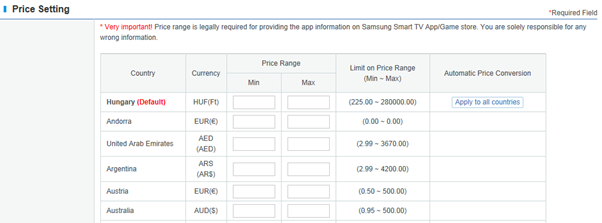
Price Setting
The price range information of products that you actually sell in your application is required by country. This information is not used for actual payment, but for providing legally-required application information on the Samsung Smart TV App/Game store which.
Therefore, it has to be updated when the price range of your products is changed.
Differences when Using Dynamic Products
During buyItem(), when using dynamic products the partner needs to set the following values in order to complete the payment process:
"OrderItemID" - Representative productID that is registered to DPI Portal as a dynamic product type
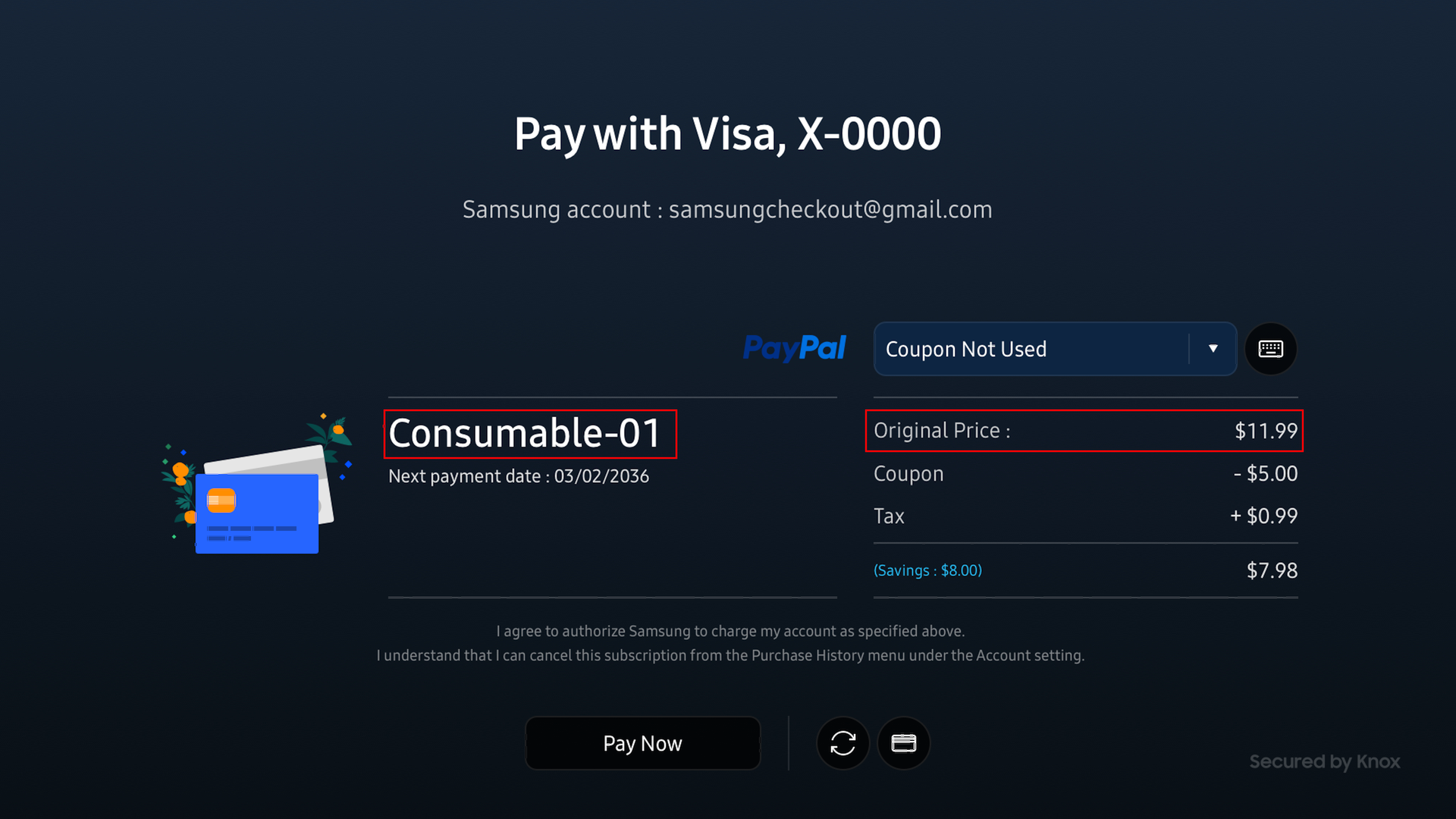
"OrderTitle" - Customized name for each purchase displayed as in Figure 7.
"OrderTotal" - Customized price for each purchase displayed as in Figure 7.
"DynmcProductID" - Unique product ID managed by the partner CMS.
In addition, during Verify Product, the partner needs to strictly verify the following values in order to identify if the product information is appropriate:
"appId" - The application has to be appropriate for this payment process.
"productId" - The product ID has to match the representative ProductID from the DPI Portal.
"productPrice" - The price of the product that partner intended to sell to user.
"dynmcProductID" - The product ID is an appropriate ID that is being handled by the partner CMS.
Checkout Service County/Location List
No.
Area
Country (ENG)
Business Model
1
North America
Canada
Agent
2
North America
United States
Commissionaire
3
Europe
Aland Islands
Commissionaire
4
Europe
Albania
Agent
5
Europe
Austria
Commissionaire
6
Europe
Belgium
Commissionaire
7
Europe
Bosnia and Herzegovina
Agent
8
Europe
Bulgaria
Commissionaire
9
Europe
Croatia
Commissionaire
10
Europe
Cyprus
Commissionaire
11
Europe
Czech Republic
Commissionaire
12
Europe
Denmark
Commissionaire
13
Europe
Estonia
Commissionaire
14
Europe
Faroe Islands
Commissionaire
15
Europe
Finland
Commissionaire
16
Europe
France
Commissionaire
17
Europe
Germany
Commissionaire
18
Europe
Greece
Commissionaire
19
Europe
Greenland
Commissionaire
20
Europe
Guernsey
Commissionaire
21
Europe
Hungary
Commissionaire
22
Europe
Iceland
Agent
23
Europe
Ireland
Commissionaire
24
Europe
Isle of Man
Commissionaire
25
Europe
Italy
Commissionaire
26
Europe
Jersey
Commissionaire
27
Europe
Latvia
Commissionaire
28
Europe
Lithuania
Commissionaire
29
Europe
Luxembourg
Commissionaire
30
Europe
Montenegro
Agent
31
Europe
Netherlands
Commissionaire
32
Europe
North Macedonia
Agent
33
Europe
Norway
Commissionaire
34
Europe
Poland
Commissionaire
35
Europe
Portugal
Commissionaire
36
Europe
Romania
Commissionaire
37
Europe
Serbia
Agent
38
Europe
Slovakia
Commissionaire
39
Europe
Slovenia
Commissionaire
40
Europe
Spain
Commissionaire
41
Europe
Sweden
Commissionaire
42
Europe
Switzerland
Agent
43
Europe
United Kingdom
Commissionaire
44
Asia
Australia
Agent
45
Asia
Hong Kong
Agent
46
Asia
India
Agent
47
Asia
Indonesia
Agent
48
Asia
Korea, Republic of
Agent
49
Asia
Malaysia
Agent
50
Asia
New Zealand
Agent
51
Asia
Philippines
Agent
52
Asia
Singapore
Agent
53
Asia
Taiwan
Agent
54
Asia
Thailand
Agent
55
Asia
Vietnam
Agent
56
CIS
Belarus
Agent
57
CIS
Kazakhstan
Agent
58
CIS
Kyrgyzstan
Agent
59
CIS
Moldova
Agent
60
CIS
Mongolia
Agent
61
CIS
Russian Federation
Agent
62
CIS
Tajikistan
Agent
63
CIS
Turkmenistan
Agent
64
CIS
Ukraine
Agent
65
CIS
Uzbekistan
Agent
66
LATAM
Argentina
Agent
67
LATAM
Bolivia
Agent
68
LATAM
Brazil
Agent
69
LATAM
Chile
Agent
70
LATAM
Colombia
Agent
71
LATAM
Costa Rica
Agent
72
LATAM
Dominican Republic
Agent
73
LATAM
Ecuador
Agent
74
LATAM
Guatemala
Agent
75
LATAM
Mexico
Agent
76
LATAM
Panama
Agent
77
LATAM
Peru
Agent
78
LATAM
Venezuela
Agent
79
MENA
Algeria
Agent
80
MENA
Bahrain
Agent
81
MENA
Egypt
Agent
82
MENA
Ghana
Agent
83
MENA
Iraq
Agent
84
MENA
Israel
Agent
85
MENA
Jordan
Agent
86
MENA
Kenya
Agent
87
MENA
Kuwait
Agent
88
MENA
Lebanon
Agent
89
MENA
Libya
Agent
90
MENA
Mauritius
Agent
91
MENA
Morocco
Agent
92
MENA
Nigeria
Agent
93
MENA
Oman
Agent
94
MENA
Pakistan
Agent
95
MENA
Qatar
Agent
96
MENA
Saudi Arabia
Agent
97
MENA
South Africa
Agent
98
MENA
Tunisia
Agent
99
MENA
Türkiye
Agent
100
MENA
United Arab Emirates
Agent
101
MENA
Yemen
Agent
102
LATAM
Paraguay
Agent
103
LATAM
Uruguay
Agent
104
LATAM
El Salvador
Agent
105
LATAM
Honduras
Agent
106
LATAM
Nicaragua
Agent
107
LATAM
Bahamas
Agent
108
LATAM
Jamaica
Agent
109
LATAM
Trinidad & Tobago
Agent
110
Asia
Cambodia
Agent
111
Asia
Myanmar
Agent
112
Asia
Laos
Agent
113
Asia
Macao
Agent
114
Asia
Bangladesh
Agent
115
Asia
Nepal
Agent
116
Asia
Sri Lanka
Agent
117
CIS
Armenia
Agent
118
CIS
Azerbaijan
Agent
119
CIS
Georgia
Agent
120
Europe
Liechtenstein
Agent
Table 1: Samsung Checkout service countries
Manage Your Cookies
We use cookies to improve your experience on our website and to show you relevant
advertising. Manage you settings for our cookies below.
Essential Cookies
These cookies are essential as they enable you to move around the website. This
category cannot be disabled.
Company
Domain
Samsung Electronics
developer.samsung.com, .samsung.com
Analytical/Performance Cookies
These cookies collect information about how you use our website. for example which
pages you visit most often. All information these cookies collect is used to improve
how the website works.
Company
Domain
Samsung Electronics
.samsung.com
Functionality Cookies
These cookies allow our website to remember choices you make (such as your user name, language or the region your are in) and
tailor the website to provide enhanced features and content for you.
Company
Domain
Samsung Electronics
developer.samsung.com, google.account.samsung.com
Preferences Submitted
You have successfully updated your cookie preferences.