Open beta. Action Framework 2.0 is being opened to partners in stages. This page explains, in product terms, what the framework is, why Samsung is introducing it, and what changes for users and partners. Detailed implementation documentation and tooling are provided to partners who join the program — see the end of this page.
The problem we are solving
TVs are becoming AI devices. Users increasingly expect to speak to the TV the way they speak to a person:
"Play some calm jazz."
"Save this page and add the event to my calendar."
"Remind me when this one is on." — while browsing the TV guide
"Play music that matches this picture." — while viewing a photo
"Turn off the living-room lights."
Behind each of these sentences, an AI assistant has to do three things: find the application that can do it, understand exactly how to trigger that capability — what to send and what comes back — and run it. Until now there was no standard way for an application to tell the assistant what it can do. Every application needed its own bespoke integration, the assistant had to be taught each one separately, and combining two applications in a single request was practically impossible.
What Action Framework 2.0 is
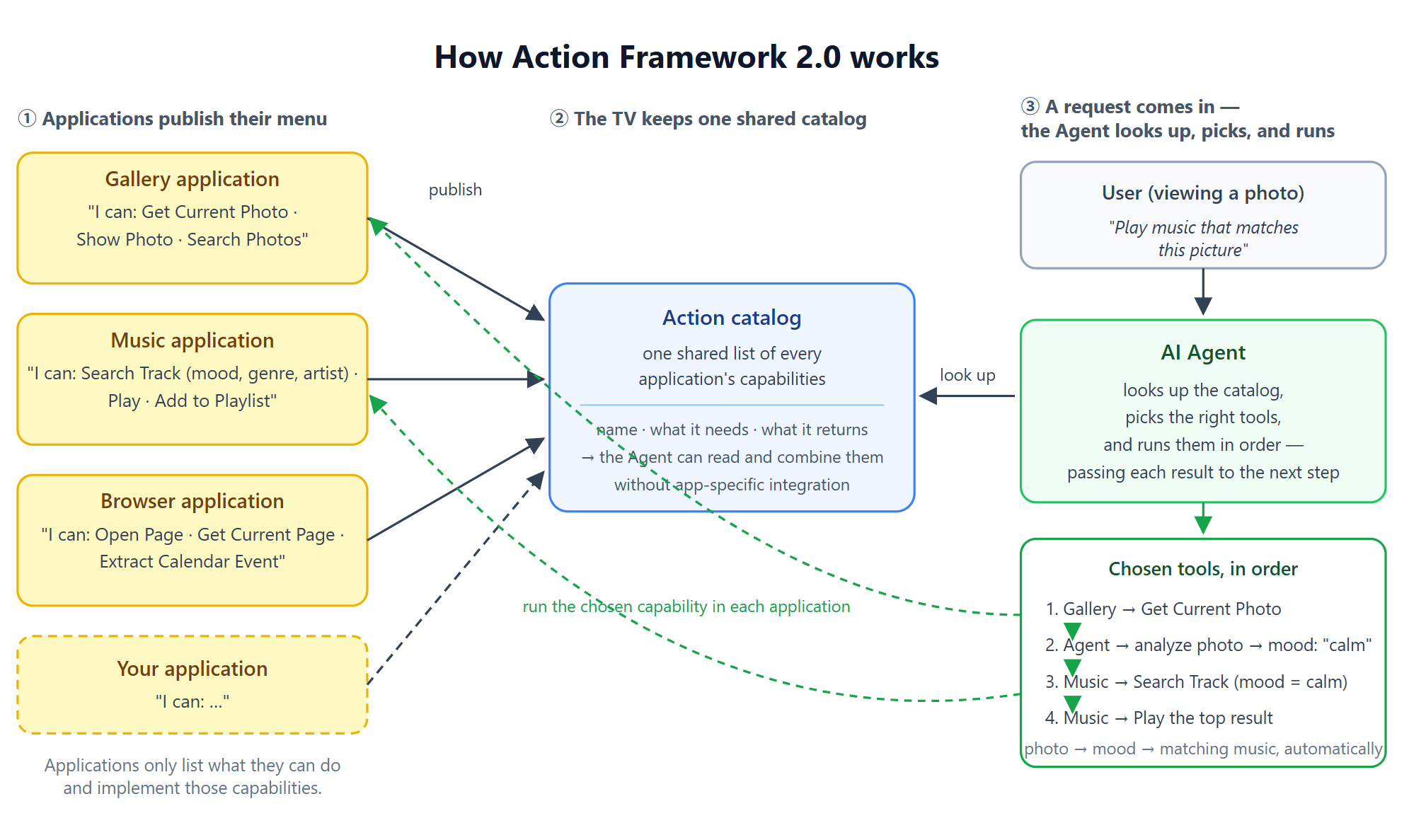
Action Framework 2.0 is a standardized "menu" that applications publish to say "here's what I can do."
Each application lists its capabilities as Actions — for example Search Track, Play, Open Page, Save Bookmark, Get Devices, Set Power — each with a clearly defined input and output.
The TV collects every application's menu into one shared catalog.
When the user asks for something, the AI assistant reads the catalog, chooses the right Action, and calls the application that provides it — through one common mechanism, for every application.
The application implements only the capability itself. Publishing it, describing it to the assistant, and routing the request are handled by the platform.
What gets better
For users
Before
With Action Framework 2.0
Voice control works only for features the assistant was hand-wired to
Any application that publishes Actions becomes controllable by the assistant, immediately and consistently
One request, one application
One request can span several applications — "remind me when this one is on" runs the TV guide and the reminder application together
The assistant does not know what is on screen
Applications can annotate what they display, so "the second one" or "this one" resolves to the actual item the user is looking at
Results come back as text the assistant has to re-read and guess at
Results are structured data, so the assistant does not misinterpret them and can pass them straight to the next step
For partner applications
Benefit
What it means for you
One integration, every assistant feature
Publish your Actions once; every assistant experience built on the catalog — voice, recommendations, multi-step tasks — works with your application without additional work
You keep control of your capabilities
You decide which Actions to expose and implement them inside your own application. The platform never reaches into your application beyond the Actions you publish
Ready-made vocabulary
Samsung provides the Action and data definitions for common domains (video, music, browser, photo, IoT, health, screen sharing, on-screen views). You implement against these definitions instead of designing an AI interface from scratch
Composable by design
Because inputs and outputs are typed, your Actions can be combined with other applications' Actions in a single user request — your content becomes part of TV-wide experiences, not just your own screen
Web-first
Partner applications are JavaScript Web applications (WGT). No native code is required; the tooling generates the integration layer for you
What it looks like in practice
The user says
What happens
"Play some calm jazz"
The assistant finds a music application that publishes Search Track and Play, searches with mood = calm and genre = jazz, and plays the top result
"Save this page and add the event to my calendar"
The assistant gets the current page from the browser, asks the browser to extract a calendar event from it, and hands the event to the calendar application
"Turn off the living-room lights"
The assistant asks the IoT application for devices in the living room of type light and calls Set Power with off
"Remind me when this one is on" (while browsing the TV guide)
The assistant reads what the TV guide is showing on screen and resolves this one to the focused program — title, channel, start time — then hands it to the reminder application, which registers the reminder and notifies the user when the program starts
"Play music that matches this picture" (while viewing a photo)
The assistant gets the current photo from the gallery, analyzes it to extract a mood (for example calm, warm evening), searches the music application by that mood, and plays the top result — the user never has to name a song
"Add the second one to my list"
The assistant reads the items the application is showing on screen, identifies the second one, and calls the application's Add to Watchlist
"Show me what's playing"
The assistant asks the music application for the current track and renders it in the TV's own presentation layer
Where the framework comes from
An internal 1.0 of the framework existed but was never released publicly. In 1.0, capabilities were exposed as opaque bundles: the assistant could launch a feature but could not reason about what went in or came out, so features could not be combined. 2.0 introduces typed Actions and data definitions, a platform-wide catalog, and generated integration code, and is the first version opened to partners.
Beta program: what partners can do now
During the open beta, partner applications can:
Review the published Action catalog for the domains above and identify which Actions map to your application's features.
Implement and register your Actions in your Web application using the partner development guide and tooling provided under the program.
Test on a development TV or emulator with the supplied verification tools, and submit feedback.
The beta scope covers JavaScript Web applications. Platform interfaces, the Action catalog, and the tooling may still evolve during the beta; partners in the program are notified of changes and receive updated tooling.
Try it before general availability
The development guide, tooling, and sample applications are not published on this site during the beta. If you would like to try Action Framework 2.0 in your application before the official release, contact your Samsung partner manager — we will onboard you to the program and provide the materials directly.
Note: Action Framework 2.0 is in beta. Program details, APIs, and schemas may change before the official release. Existing partner integrations will be supported through a migration path.
Manage Your Cookies
We use cookies to improve your experience on our website and to show you relevant
advertising. Manage you settings for our cookies below.
Essential Cookies
These cookies are essential as they enable you to move around the website. This
category cannot be disabled.
Company
Domain
Samsung Electronics
developer.samsung.com, .samsung.com
Analytical/Performance Cookies
These cookies collect information about how you use our website. for example which
pages you visit most often. All information these cookies collect is used to improve
how the website works.
Company
Domain
Samsung Electronics
.samsung.com
Functionality Cookies
These cookies allow our website to remember choices you make (such as your user name, language or the region your are in) and
tailor the website to provide enhanced features and content for you.
Company
Domain
Samsung Electronics
developer.samsung.com, google.account.samsung.com
Preferences Submitted
You have successfully updated your cookie preferences.