Each WebAssembly module is a project that has build properties assigned to it. The most important of them are described here.
To access the build properties of a WebAssembly module, right-click the module and select "Properties".
Build Environment
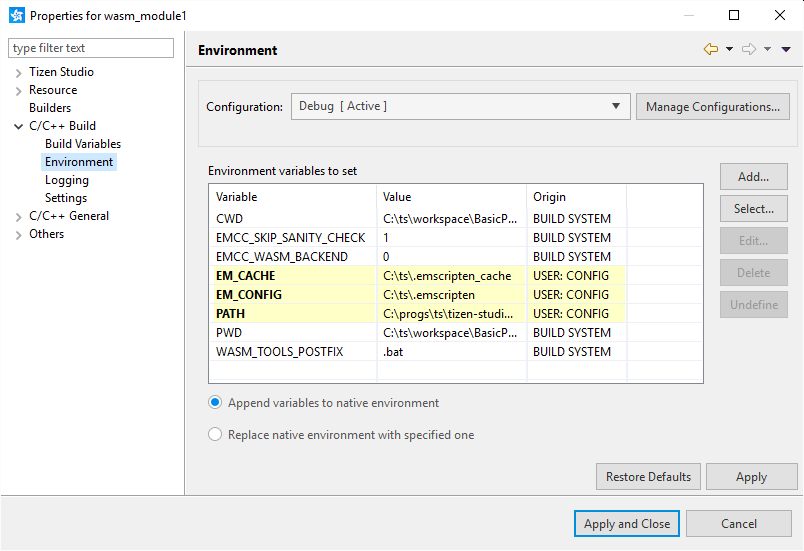
To view the build environment properties, expand the "C/C++ Build" section in the "Properties" dialog window and click "Environment".
The following environment variables can be modified in the WebAssembly build:
Variable
Description
EMCC_SKIP_SANITY_CHECK
Disables or enables various sanity checks done by the Samsung Emscripten SDK
EMCC_WASM_BACKEND
In the current Samsung Emscripten SDK version, this value must be set to '0'. If you use another Samsung Emscripten SDK version, you can change the value if you encounter build errors such as:
error: unknown target triple 'asmjs-unknown-emscripten', please use -triple or -archorshared:ERROR: emcc: WASM_BACKEND selected but could not find lld (wasm-ld): ...
EM_CACHE
The "Cache directory" value you set when configuring the Emscripten SDK is copied here on each build
EM_CONFIG
The "Configuration file" path you set when configuring the Samsung Emscripten SDK is copied here on each build
PATH
Paths of the Samsung Emscripten SDK binary tools are prepended to this PATH variable
WASM_TOOLS_POSTFIX
Must be set to ".bat" on Windows®, empty on other operating systems
Table 1: Build Environment Variables
Build Settings
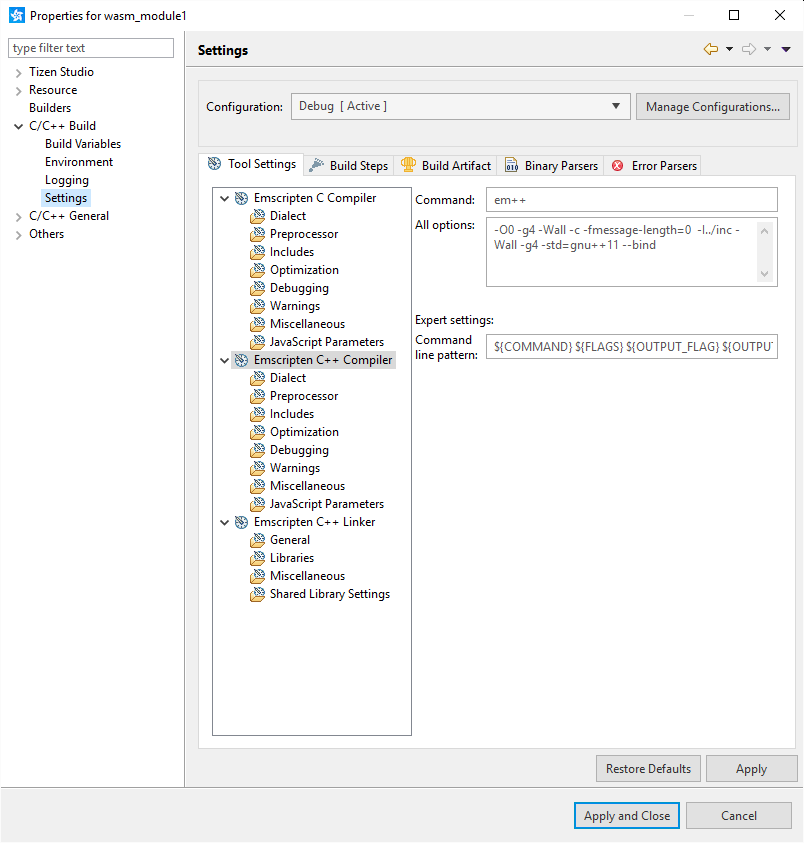
To view the build settings properties, expand the "C/C++ Build" section in the "Properties" dialog window and click "Settings".
The following tabs are customized to support building WebAssembly modules:
"Tool Settings" tab is used for setting compilation and linking flags. In particular you can define include and library search paths and add libraries to link to.
"Build Artifact" tab defines the artifact details. By default, the artifact name is set to be the same as the WebAssembly module project name and the artifact extension is set to "js". Do not change the extension, since it can break the build.
Manage Your Cookies
We use cookies to improve your experience on our website and to show you relevant
advertising. Manage you settings for our cookies below.
Essential Cookies
These cookies are essential as they enable you to move around the website. This
category cannot be disabled.
Company
Domain
Samsung Electronics
developer.samsung.com, .samsung.com
Analytical/Performance Cookies
These cookies collect information about how you use our website. for example which
pages you visit most often. All information these cookies collect is used to improve
how the website works.
Company
Domain
Samsung Electronics
.samsung.com
Functionality Cookies
These cookies allow our website to remember choices you make (such as your user name, language or the region your are in) and
tailor the website to provide enhanced features and content for you.
Company
Domain
Samsung Electronics
developer.samsung.com, google.account.samsung.com
Preferences Submitted
You have successfully updated your cookie preferences.